Web Server Control Lab
Task 1
Task 1- Sensor Monitoring (15 pts)
- Read temperature and humidity from the DHT11.
- Measure distance using the HC-SR04 ultrasonic sensor.
- Display all sensor values on the webpage.
- Refresh the readings every 1–2 seconds.
- Evidence: Screenshot showing the sensor readings on the webpage.
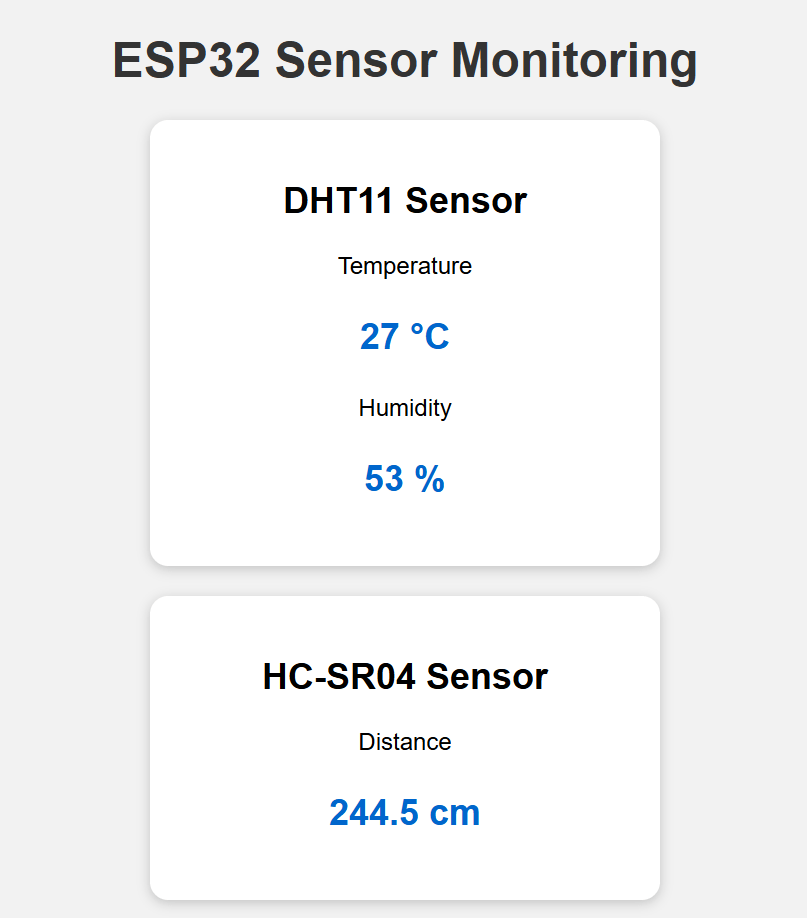
The webpage should display similar to this
import network
import socket
import time
import dht

from machine import Pin, time_pulse_us
Task 1
Import the library
## WIFI Setup

ssid = "________"
password = "________"
WIFI Setup
# DHT11 data pin
dht_sensor = ________

# HC-SR04 pins
trig = ________
echo = ________
Sensor Pin Setup
def read_distance():
    try:
        # set Trigger to off for 2us

  		________

        # set Trigger to on for 10us

       	________

        # set Trigger to off again

        ________

        # Measure the ECHO pulse
        duration = time_pulse_us(echo, 1, 30000)

        # make a codition if the duration less than 0 return None
        ________

        # Convert time to distance in centimetres with the formular d = v*t/2
        ________

        return distance

    except Exception as error:
        print("Ultrasonic error:", error)
        return None
Task 1
Create a read distance function from the ultrasonic
Task 1
def read_dht11():
    try:
    	# Call the object from the dht library
        dht_sensor.measure()


        temperature = ________
        humidity = ________

        return temperature, humidity

    except Exception as error:
        print("DHT11 error:", error)
        return None, None
Create a read temperature and humidity Function
Task 1
Create a webpage Function
def create_webpage(temperature, humidity, distance):

    if temperature is None:
        temperature_text = "Sensor error"
    else:
        temperature_text = str(temperature) + " °C"

    if humidity is None:
        humidity_text = "Sensor error"
    else:
        humidity_text = str(humidity) + " %"

    if distance is None:
        distance_text = "Out of range"
    else:
        distance_text = "{:.1f} cm".format(distance)

    html = """
<!DOCTYPE html>
<html>

<head>
    <title>ESP32 Sensor Monitoring</title>

    <meta name="viewport"
          content="width=device-width, initial-scale=1">

    <meta http-equiv="refresh" content="2">

    <style>
        body {
            font-family: Arial;
            text-align: center;
            background-color: #f2f2f2;
            margin: 0;
            padding: 20px;
        }

        h1 {
            color: ________
        }

        .card {
            background-color: white;
            width: ________;
            margin: ________ ________;
            padding: ________;
            border-radius: ________;
            box-shadow: 0 2px 8px rgba(0, 0, 0, 0.2);
        }

        .value {
            color: ________;
            font-size: ________;
            font-weight: bold;
        }
    </style>
</head>

<body>

    <h1>---</h1>

    <div
         ________ ##complete this part by using the class card and display the temerature and humidity--
    </div>

    <div
         ________ ##Complete this part by using the class card and distance from the ultrasonic sensor---
    </div>


</body>

</html>
"""

    html = html.replace(
        "TEMPERATURE_VALUE",
        temperature_text
    )

    html = html.replace(
        "HUMIDITY_VALUE",
        humidity_text
    )

    html = html.replace(
        "DISTANCE_VALUE",
        distance_text
    )

    return html
Task 1
Connect to WIFI
wifi = network.WLAN(network.STA_IF)
wifi.active(True)

if not wifi.isconnected():
    print("Connecting to Wi-Fi...")
    wifi.connect(ssid, password)

    while not wifi.isconnected():
        print(".", end="")
        time.sleep(1)

ip = wifi.ifconfig()[0]

print()
print("Wi-Fi connected!")
print("ESP32 IP address:", ip)
print("Open this address in your browser:")
print("http://" + ip)


# ==============================
# START WEB SERVER
# ==============================

address = socket.getaddrinfo(
    "0.0.0.0",
    80
)[0][-1]

server = socket.socket()

server.setsockopt(
    socket.SOL_SOCKET,
    socket.SO_REUSEADDR,
    1
)

server.bind(address)
server.listen(1)

print("Web server is running...")
while True:

    client = None

    try:
        client, client_address = server.accept()

        print("Browser connected:", client_address)

        # Receive browser request
        request = client.recv(1024)
        print("Request received")

        # Read sensors
        temperature, humidity = ________
        distance = ________

        print("Temperature:", temperature)
        print("Humidity:", humidity)
        print("Distance:", distance)

        # Create webpage
        webpage = ________

        # Send HTTP response
        client.send("HTTP/1.1 200 OK\r\n")
        client.send("Content-Type: text/html\r\n")
        client.send("Connection: close\r\n")
        client.send("\r\n")
        client.sendall(webpage)

    except Exception as error:
        print("Server error:", error)

    finally:
        if client is not None:
            client.close()
Task 1
Main Program
Task 2
Task 2 – Sensor Data to LCD (15 pts)
- Add two toggle buttons to the webpage:
- Show/Hide Distance:
Click Show Distance to display the ultrasonic distance on LCD line 1. The button then changes to Hide Distance. Click it again to clear LCD line 1. - Show/Hide Temperature:
Click Show Temperature to display the temperature on LCD line 2. The button then changes to Hide Temperature. Click it again to clear LCD line 2. - Evidence:
Submit a short video showing both buttons changing between Show and Hide, with the corresponding values appearing and disappearing on the LCD.
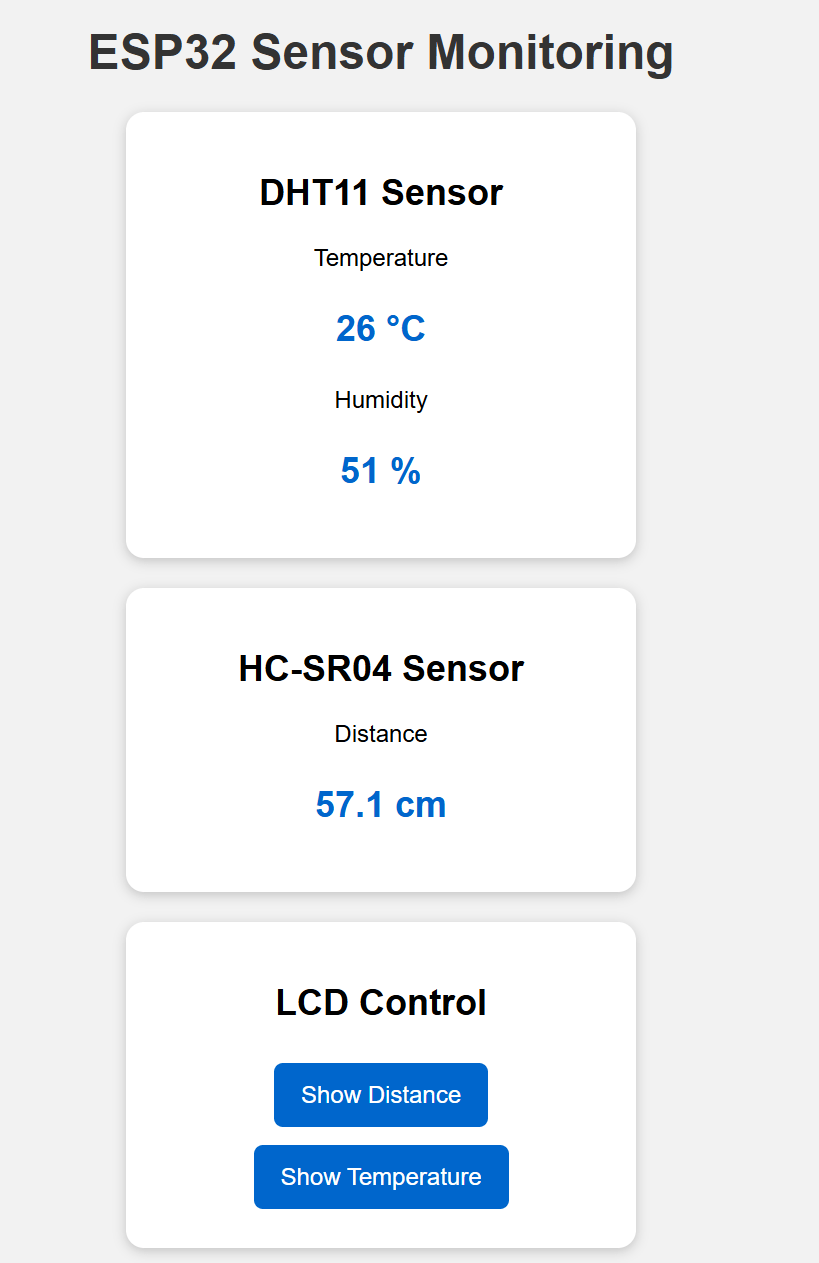
The webpage should display similar to this
Task 2
# Library ADDITION

from machine import SoftI2C
from machine_i2c_lcd import I2cLcd
Add LCD Library to Task 1 code
Add LCD SETUP
I2C_ADDR = 0x27

i2c = SoftI2C(
    sda=Pin(21),
    scl=Pin(22),
    freq=400000
)

lcd = I2cLcd(
    i2c,
    I2C_ADDR,
    2,
    16
)

lcd.clear()


### Display the text -> IoT Class on the first row
________
### Display the text -> Lab 2 & Task 2 on the second Row
________

time.sleep(2)

lcd.clear()
Set the Show state to False
show_distance = False
show_temperature = False
Task 2
Add a function to clear the ROW
def clear_lcd_row(row):

    lcd.move_to(0, row)

    # 16 spaces clear the entire row
    lcd.putstr("                ")
Add a function to display the Distance
def display_distance(distance):


    ### write a code to display the distance if the distance is
    ### None display "Distance Error"  and if not display the
    ### Ultrasonic Distance on the First Row of the LCD
    ________
Add a function to display the Temperature
def display_temperature(temperature):


    ### write a code to display the Temperature if the Temperature is
    ### None display "Temp Error"  and if not display the
    ### Temperature Reading on the Second Row of the LCD
    ________
Task 2
Create a webpage Function
def create_webpage(
    temperature,
    humidity,
    distance,
    show_distance,
    show_temperature
):

    if temperature is None:
        temperature_text = "Sensor error"
    else:
        temperature_text = (
            str(temperature) + " °C"
        )

    if humidity is None:
        humidity_text = "Sensor error"
    else:
        humidity_text = (
            str(humidity) + " %"
        )

    if distance is None:
        distance_text = "Out of range"
    else:
        distance_text = (
            "{:.1f} cm".format(distance)
        )

    # TASK 3 ADDITION
    if show_distance:
        distance_button_text = "Hide Distance"
        distance_button_class = "hide-button"
    else:
        distance_button_text = "Show Distance"
        distance_button_class = "show-button"

    # TASK 3 ADDITION
    if show_temperature:
        temperature_button_text = (
            "Hide Temperature"
        )

        temperature_button_class = (
            "hide-button"
        )

    else:
        temperature_button_text = (
            "Show Temperature"
        )

        temperature_button_class = (
            "show-button"
        )

    html = """
<!DOCTYPE html>
<html>

<head>
    <title>ESP32 Sensor Monitoring</title>

    <meta name="viewport"
          content="width=device-width,
                   initial-scale=1">

    <meta http-equiv="refresh"
          content="2; URL=/">

    <style>
        body {
            font-family: Arial;
            text-align: center;
            background-color: #f2f2f2;
            margin: 0;
            padding: 20px;
        }

        h1 {
            color: ________;
        }

        .card {
            background-color: white;
            width: ________;
            margin: ________ ________;
            padding: ________;
            border-radius: ________;

            box-shadow:
                0 2px 8px
                rgba(0, 0, 0, 0.2);
        }

        .value {
            color: ________;
            font-size: ________;
            font-weight: bold;
        }

        button {
            border: none;
            color: white;
            padding: ________ ________;
            margin: ________;
            border-radius: ________;
            font-size: ________;
            cursor: pointer;
        }

        .show-button {
            background-color: ________;
        }

        .hide-button {
            background-color: ________;
        }
    </style>
</head>

<body>

    <h1>________</h1>

    <div
    </div>

    <div
    </div>


    <!-- TASK 3 ADDITION -->

    <div class="card">

        <h2>LCD Control</h2>

        <a href="/?distance=toggle">

            ________###  Add the button to displace distance on the LCD here

        </a>

        <a href="/?temperature=toggle">

            ________ ###  Add the Button to display the Temperature on the LCD Here

        </a>

    </div>


</body>

</html>
"""

    html = html.replace(
        "TEMPERATURE_VALUE",
        temperature_text
    )

    html = html.replace(
        "HUMIDITY_VALUE",
        humidity_text
    )

    html = html.replace(
        "DISTANCE_VALUE",
        distance_text
    )

    # TASK 2 ADDITION
    html = html.replace(
        "DISTANCE_BUTTON_TEXT",
        distance_button_text
    )

    html = html.replace(
        "TEMPERATURE_BUTTON_TEXT",
        temperature_button_text
    )

    html = html.replace(
        "DISTANCE_BUTTON_CLASS",
        distance_button_class
    )

    html = html.replace(
        "TEMPERATURE_BUTTON_CLASS",
        temperature_button_class
    )

    return html
Main Program
Task 2
while True:

    client = None

    try:
        client, client_address = server.accept()

        print("Browser connected:", client_address)

        # Receive and decode browser request
        request = client.recv(1024).decode()

        print("Request received")

        # Read sensors
        temperature, humidity = ________### call the dht reading function
        distance = ________### call the ultrasonic distance reading function

        print("Temperature:", temperature)
        print("Humidity:", humidity)
        print("Distance:", distance)


        # TASK 2: DISTANCE BUTTON


        if "/?distance=toggle" in request:

            show_distance = not show_distance

            if show_distance:

                # Display the current distance on the LCD
                display_distance(________________)

                print("Distance shown on LCD")

            else:

                # Clear LCD line 1
                # Remember: LCD row numbering starts from 0
                clear_lcd_row(________________)

                print("Distance hidden")


        # TASK 2: TEMPERATURE BUTTON


        elif "/?temperature=toggle" in request:

            show_temperature = not show_temperature

            if show_temperature:

                # Display the current temperature on the LCD
                display_temperature(________)

                print("Temperature shown on LCD")

            else:

                # Clear LCD line 2
                # Remember: LCD row numbering starts from 0
                clear_lcd_row(________)

                print("Temperature hidden")


        # Update the values while they are shown
        if show_distance:
            display_distance(distance)

        if show_temperature:
            display_temperature(temperature)


        # Create webpage
        webpage = ________ ###  call the function create the webpage


        # Send HTTP response
        client.send("HTTP/1.1 200 OK\r\n")
        client.send("Content-Type: text/html\r\n")
        client.send("Connection: close\r\n")
        client.send("\r\n")
        client.sendall(webpage)


    except Exception as error:
        print("Server error:", error)


    finally:
        if client is not None:
            client.close()