Web Server Control Lab
Task 3
Task 3 - Web-Controlled Servo (20 pts)
• Connect an SG90 servo motor to the ESP32.
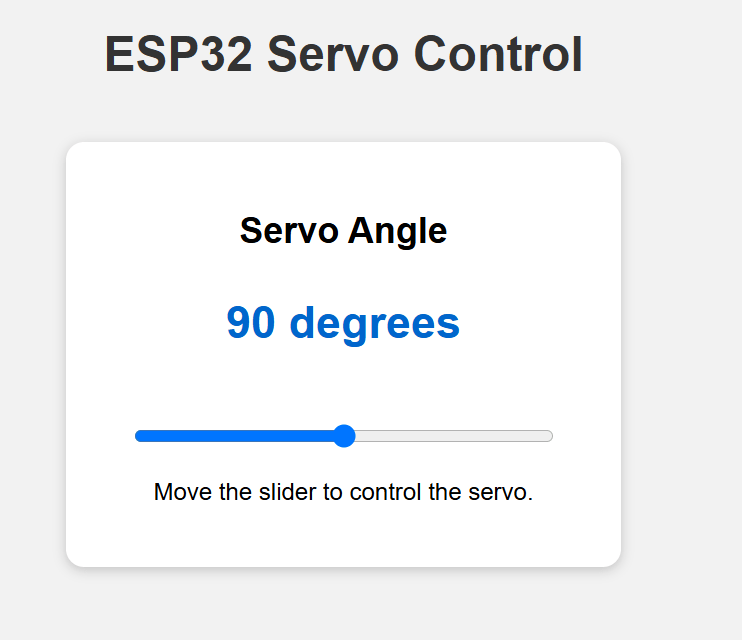
• Add a slider to the web page with a range from 0 to 180 degrees.
• Moving the slider must change the servo angle.
• Display the selected angle on the web page.
• Evidence: Short video showing the web slider, servo movement.
The webpage should display similar to this
Task 3
Import the library
import network
import socket
import time

from machine import Pin, PWM
Wifi Setting
# WIFI SETTINGS

ssid = "________"
password = "________"
Servo Setup
# SERVO SETUP

servo = ________ ## add the pin that you use with the 50hz frequency

servo_angle = 90  ## set servo angle to 90 degree
Task 3
Create a move servo angle function
def move_servo(angle):

    # Keep the angle between 0 and 180 degrees
    if angle < ______:
        angle = ______

    if angle > ______:
        angle = ______


    # Servo PWM duty range
    duty_min = ______
    duty_max = ______

    # Convert angle 0-180 degrees servo duty
    duty = int(
        duty_min
        + (angle / ______)
        * (duty_max - duty_min)
    )


    # Send the calculated duty to the servo
    servo.duty(________)


    print("Servo angle:", angle)
    print("PWM duty:", duty)
Task 3
Create a Webpage
def create_webpage(angle):

    html = """
<!DOCTYPE html>

<html>

<head>

    <title>ESP32 Servo Control</title>

    <meta name="viewport"
          content="width=device-width,
                   initial-scale=1">

    <style>

        body {
            font-family: Arial;
            text-align: center;
            background-color: #f2f2f2;
            padding: 20px;
        }

        h1 {
            color: ________________;
        }

        .card {
            background-color: white;
            width: ________________;
            margin: ________________ ________________;
            padding: ________________;
            border-radius: ________________;

            box-shadow:
                0 2px 8px
                rgba(0, 0, 0, 0.2);
        }

        .angle {
            color: ________________;
            font-size: ________________;
            font-weight: bold;
        }

        input[type="range"] {
            width: 280px;
            margin-top: 20px;
        }

    </style>

</head>

<body>

    <h1>ESP32 Servo Control</h1>

    <div class="card">

        <h2>________________</h2>

        <p
        		________________ ## Add the class angle here to display the angle value on the webpage

        </p>

        <input
            type="range"
            min="0"
            max="180"
            value="SERVO_ANGLE"

            oninput="
                document.getElementById(
                    'angle-value'
                ).innerHTML = this.value
            "

            onchange="
                fetch(
                    '/servo?angle=' + this.value
                )
            "
        >

        <p>
            Move the slider to control the servo.
        </p>

    </div>

</body>

</html>
"""

    html = html.replace(
        "SERVO_ANGLE",
        str(angle)
    )

    return html
Task 3
WIFI Connection
# CONNECT TO WIFI

wifi = network.WLAN(
    network.STA_IF
)

wifi.active(True)

if not wifi.isconnected():

    print("Connecting to Wi-Fi...")

    wifi.connect(
        ssid,
        password
    )

    while not wifi.isconnected():
        print(".", end="")
        time.sleep(1)


ip = wifi.ifconfig()[0]

print()
print("Wi-Fi connected!")
print("ESP32 IP address:", ip)
print("Open this address:")
print("http://" + ip)


# ==============================
# START WEB SERVER
# ==============================

address = socket.getaddrinfo(
    "0.0.0.0",
    80
)[0][-1]

server = socket.socket()

server.setsockopt(
    socket.SOL_SOCKET,
    socket.SO_REUSEADDR,
    1
)

server.bind(address)
server.listen(1)

print("Web server is running...")
Task 3
Initial the servo position
# INITIAL SERVO POSITION


move_servo(________)
Main Program
while True:

    client = None

    try:
        client, client_address = (
            server.accept()
        )

        request = client.recv(1024)
        request = request.decode()

        request_line = request.split(
            "\r\n"
        )[0]

        print("Request:", request_line)


        # RECEIVE SLIDER ANGLE


        if "GET /servo?angle=" in request_line:

            try:
                start = ________
                end = ________
                angle_text = ________
                servo_angle = int(________)
                move_servo(________)

                client.send(
                    "HTTP/1.1 204 No Content\r\n"
                )

                client.send(
                    "Connection: close\r\n"
                )

                client.send("\r\n")

            except Exception as error:
                print(
                    "Servo control error:",
                    error
                )

        # SEND MAIN WEBPAGE


        else:

            webpage = create_webpage(
                servo_angle
            )

            client.send(
                "HTTP/1.1 200 OK\r\n"
            )

            client.send(
                "Content-Type: text/html\r\n"
            )

            client.send(
                "Connection: close\r\n"
            )

            client.send("\r\n")

            client.sendall(webpage)


    except Exception as error:

        print(
            "Server error:",
            error
        )


    finally:

        if client is not None:
            client.close()