Firestore with ESP32
ICT 360: Introduction to IoT

Mr. Seng Theara
Learning Objectives
Learning Objectives
- Develop an IoT attendance system using ESP32 and RFID
- Acquire and process RFID data using embedded programming
- Transmit and manage data using Google Firebase Firestore
- Design a mobile interface using MIT App Inventor
- Store data locally using an SD card for backup
- Implement real-time feedback using a buzzer
- Integrate hardware and cloud services into a complete IoT system
Introduction to RFID (RC522)
Introduction to RFID (RC522)
RFID means radio-frequency identification. RFID uses electromagnetic fields to transfer data over short distances.
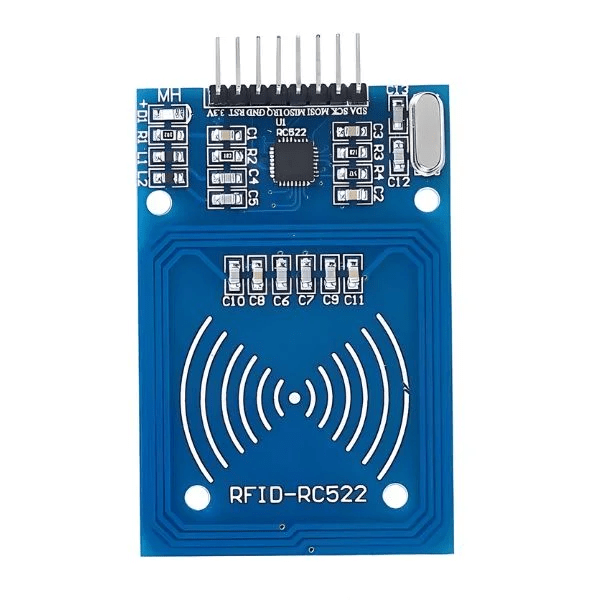
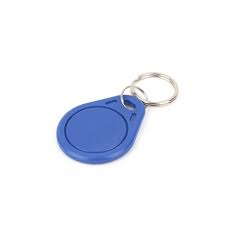

Tag / Card
Reader
- The MFRC522 RFID Module is the brain of the system
- It generates a radio frequency field (13.56 MHz)
-
It handles:
- Communication with the tag - Reading the UID - Sending data to ESP32
- Passive RFID card (no battery)
- Contains:
- Small chip (memory + UID)
- Antenna coil
- Each card has a unique UID (like ID card)
- Can also store small data
Introduction to RFID (RC522)
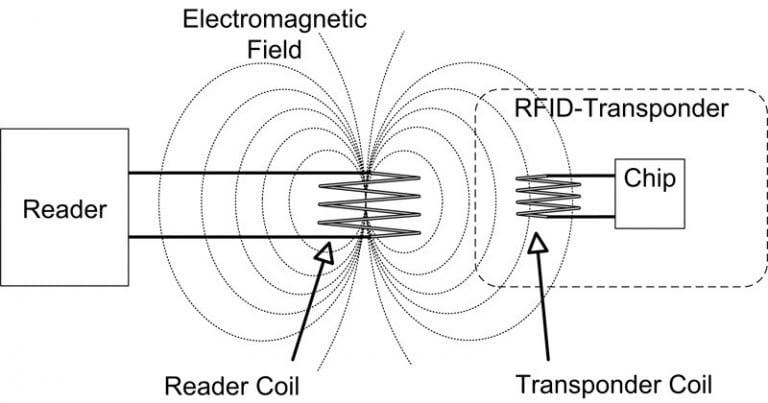
Antenna
- Both reader and card have coils
- Works using electromagnetic induction
How it works
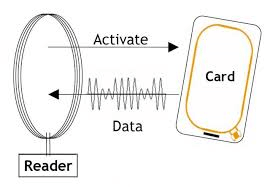
RC522 creates an electromagnetic field (13.56 MHz)
How it works
RC522 creates an electromagnetic field (13.56 MHz)
When the card comes close within short range (~3–5 cm)
The reader’s field induces voltage in the card’s coil which powers the card
How it works
1. RC522 creates an electromagnetic field (13.56 MHz)
2. When the card comes close within short range (~3–5 cm)
3. The reader’s field induces voltage in the card’s coil which powers the card
4. Once powered->The card’s chip wakes up and it prepares its UID
How it works
1. RC522 creates an electromagnetic field (13.56 MHz)
2. When the card comes close within short range (~3–5 cm)
3. The reader’s field induces voltage in the card’s coil which powers the card
4. Once powered->The card’s chip wakes up and it prepares its UID
5. The card sends data using a method called: Load Modulation
How it works
1. RC522 creates an electromagnetic field (13.56 MHz)
2. When the card comes close within short range (~3–5 cm)
3. The reader’s field induces voltage in the card’s coil which powers the card
4. Once powered->The card’s chip wakes up and it prepares its UID
5. The card sends data using a method called: Load Modulation
6. RC522 receives signal and converts it into: UID = AB 12 CD 34
Connection
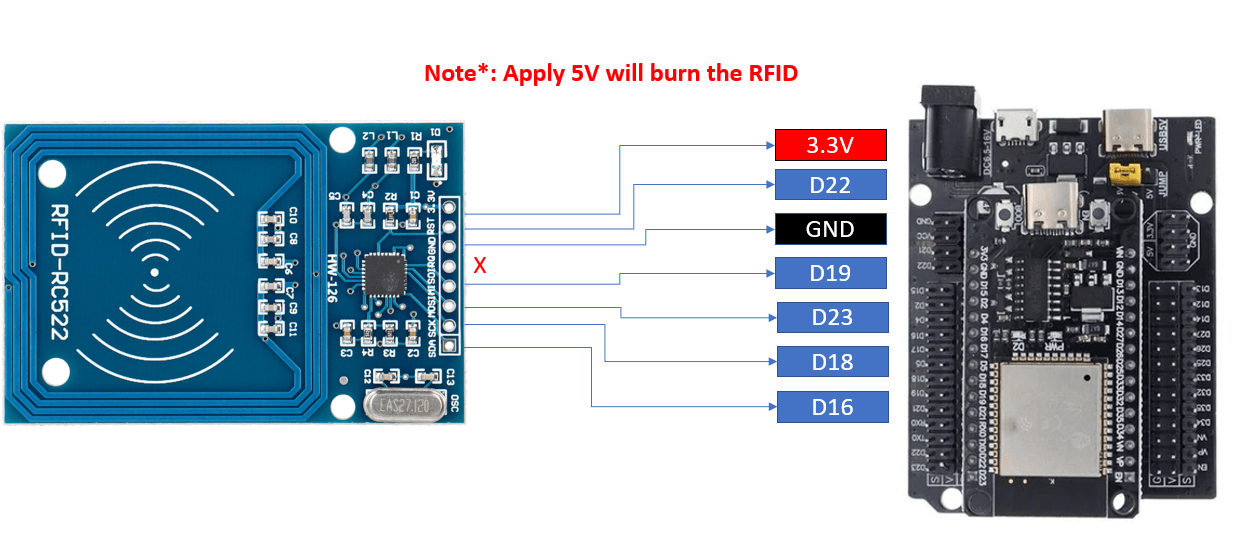
Library RFID
DC Motor
- DC Motor usually need 6V, 9V, 12V (more)
- Needs hundreds of mA to several A
from machine import Pin, SPI
import time

class MFRC522:

    OK = 0
    NOTAGERR = 1
    ERR = 2

    REQIDL = 0x26
    REQALL = 0x52

    AUTHENT1A = 0x60
    AUTHENT1B = 0x61

    def __init__(self, spi, gpioRst, gpioCs):
        self.spi = spi
        self.rst = gpioRst
        self.cs = gpioCs

        self.rst.init(Pin.OUT, value=1)
        self.cs.init(Pin.OUT, value=1)

        self.init()

    def _wreg(self, reg, val):
        self.cs.value(0)
        self.spi.write(bytearray([(reg << 1) & 0x7E]))
        self.spi.write(bytearray([val]))
        self.cs.value(1)

    def _rreg(self, reg):
        self.cs.value(0)
        self.spi.write(bytearray([((reg << 1) & 0x7E) | 0x80]))
        val = self.spi.read(1)
        self.cs.value(1)
        return val[0]

    def _sflags(self, reg, mask):
        self._wreg(reg, self._rreg(reg) | mask)

    def _cflags(self, reg, mask):
        self._wreg(reg, self._rreg(reg) & (~mask))

    def _tocard(self, cmd, send):
        recv = []
        bits = irq_en = wait_irq = n = 0
        stat = self.ERR

        if cmd == 0x0E:
            irq_en = 0x12
            wait_irq = 0x10
        elif cmd == 0x0C:
            irq_en = 0x77
            wait_irq = 0x30

        self._wreg(0x02, irq_en | 0x80)
        self._cflags(0x04, 0x80)
        self._sflags(0x0A, 0x80)

        for c in send:
            self._wreg(0x09, c)

        self._wreg(0x01, cmd)

        if cmd == 0x0C:
            self._sflags(0x0D, 0x80)

        i = 2000
        while True:
            n = self._rreg(0x04)
            i -= 1
            if not ((i != 0) and not (n & 0x01) and not (n & wait_irq)):
                break

        self._cflags(0x0D, 0x80)

        if i != 0:
            if (self._rreg(0x06) & 0x1B) == 0x00:
                stat = self.OK
                if n & irq_en & 0x01:
                    stat = self.NOTAGERR
                elif cmd == 0x0C:
                    n = self._rreg(0x0A)
                    lbits = self._rreg(0x0C) & 0x07
                    if lbits != 0:
                        bits = (n - 1) * 8 + lbits
                    else:
                        bits = n * 8
                    if n == 0:
                        n = 1
                    if n > 16:
                        n = 16
                    for _ in range(n):
                        recv.append(self._rreg(0x09))
            else:
                stat = self.ERR

        return stat, recv, bits

    def request(self, mode):
        self._wreg(0x0D, 0x07)
        stat, recv, bits = self._tocard(0x0C, [mode])
        if stat != self.OK or bits != 0x10:
            stat = self.ERR
        return stat, bits

    def anticoll(self):
        ser_chk = 0
        ser = [0x93, 0x20]
        self._wreg(0x0D, 0x00)

        stat, recv, bits = self._tocard(0x0C, ser)

        if stat == self.OK:
            if len(recv) == 5:
                for i in range(4):
                    ser_chk ^= recv[i]
                if ser_chk != recv[4]:
                    stat = self.ERR
            else:
                stat = self.ERR

        return stat, recv

    def init(self):
        self.reset()
        self._wreg(0x2A, 0x8D)
        self._wreg(0x2B, 0x3E)
        self._wreg(0x2D, 30)
        self._wreg(0x2C, 0)
        self._wreg(0x15, 0x40)
        self._wreg(0x11, 0x3D)
        self.antenna_on()

    def reset(self):
        self._wreg(0x01, 0x0F)

    def antenna_on(self):
        if ~(self._rreg(0x14) & 0x03):
            self._sflags(0x14, 0x03)
Save this file as mfrc522.py in the micropython device
Coding RFID
DC Motor
- DC Motor usually need 6V, 9V, 12V (more)
- Needs hundreds of mA to several A
from machine import Pin, SPI
from mfrc522 import MFRC522
import time

spi = SPI(1, baudrate=1000000, polarity=0, phase=0,
          sck=Pin(18), mosi=Pin(23), miso=Pin(19))

rdr = MFRC522(spi=spi, gpioRst=Pin(22), gpioCs=Pin(16))

print("Scan RFID...")

while True:
    (stat, tag_type) = rdr.request(rdr.REQIDL)

    if stat == rdr.OK:
        (stat, uid) = rdr.anticoll()

        if stat == rdr.OK:
            uid_str = "".join([str(i) for i in uid])
            print("UID:", uid_str)

            time.sleep(1)
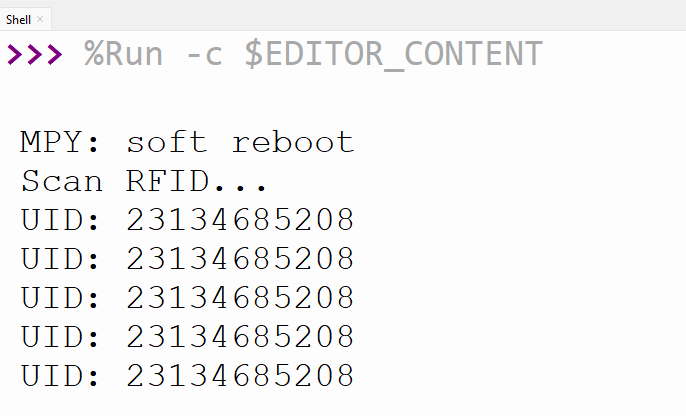
When we put tag/card on the RFID, it will print out the uid string data of that tag/card
SD Card Module
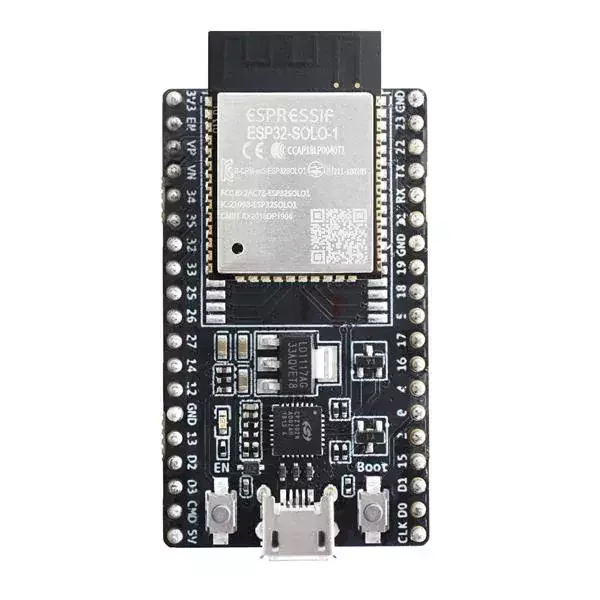
ESP32
- Output Voltage is only 3.3V
- Max Current from the pin ~12mA
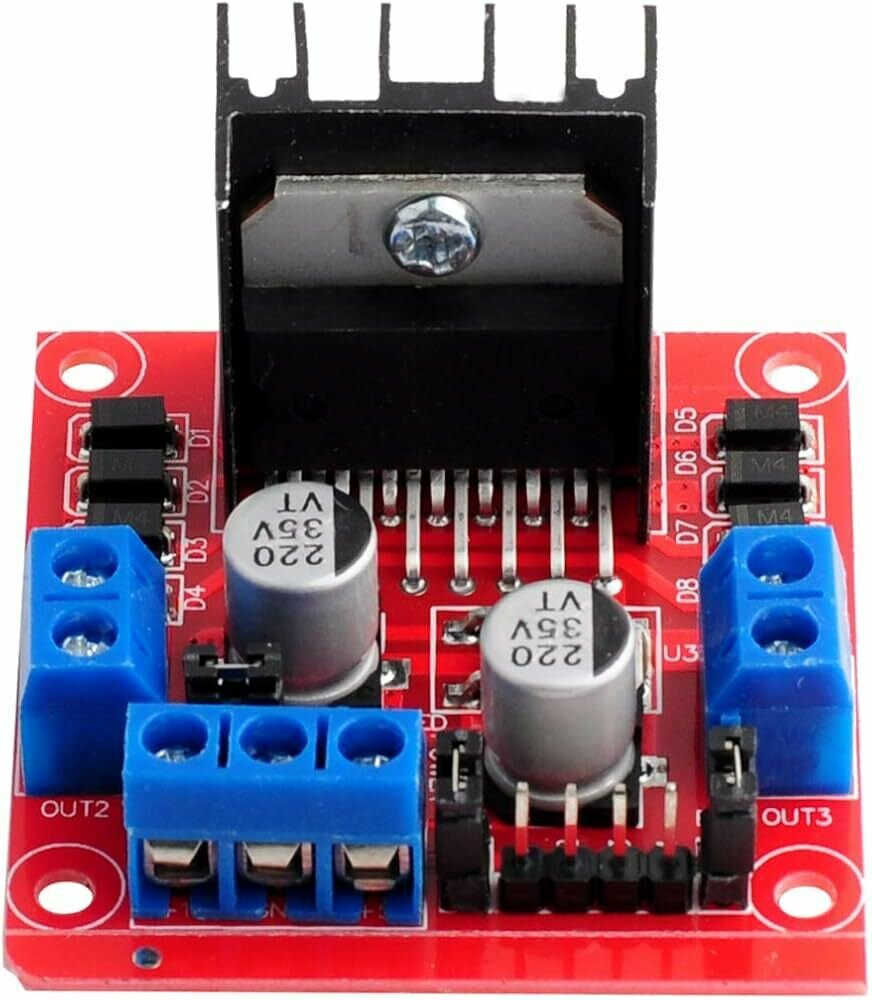
Motor Driver
SD Card Module
ESP32
- Output Voltage is only 3.3V
- Max Current from the pin ~12mA
Motor Driver
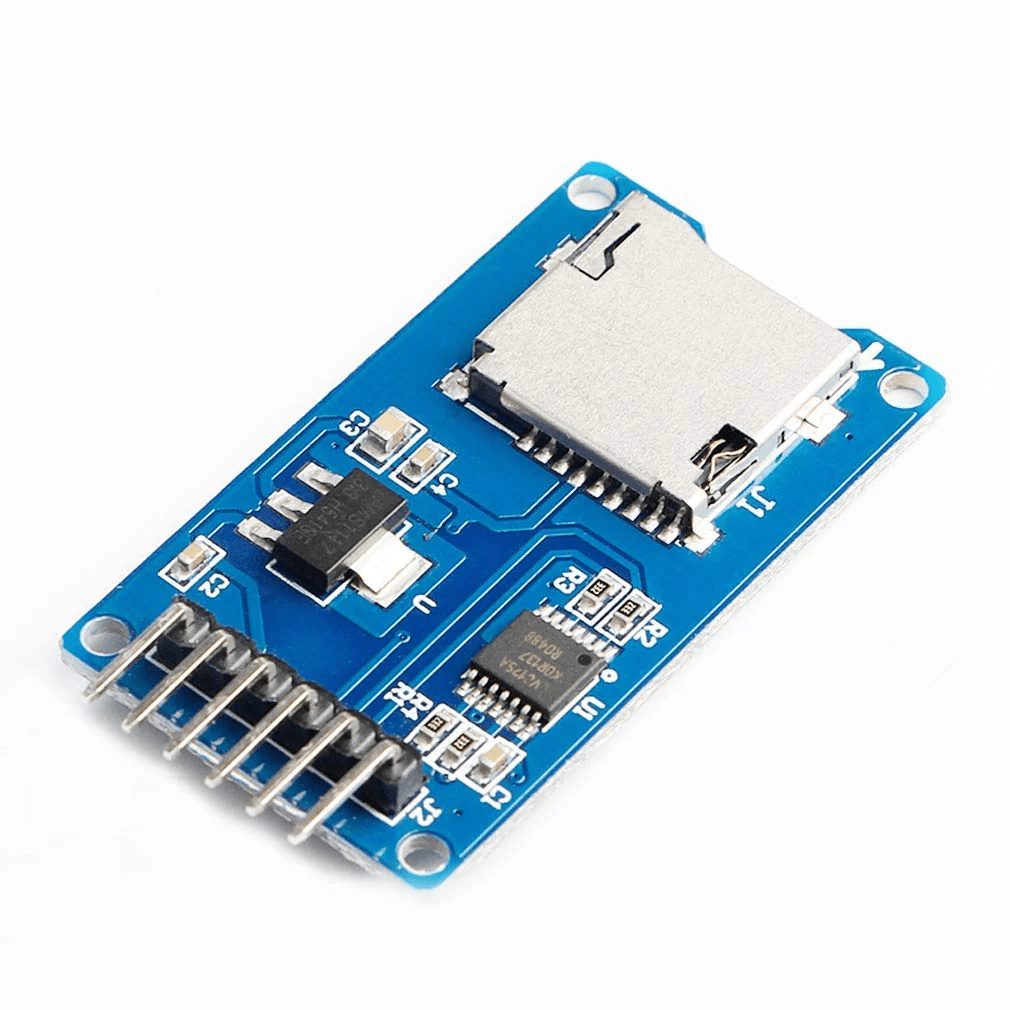
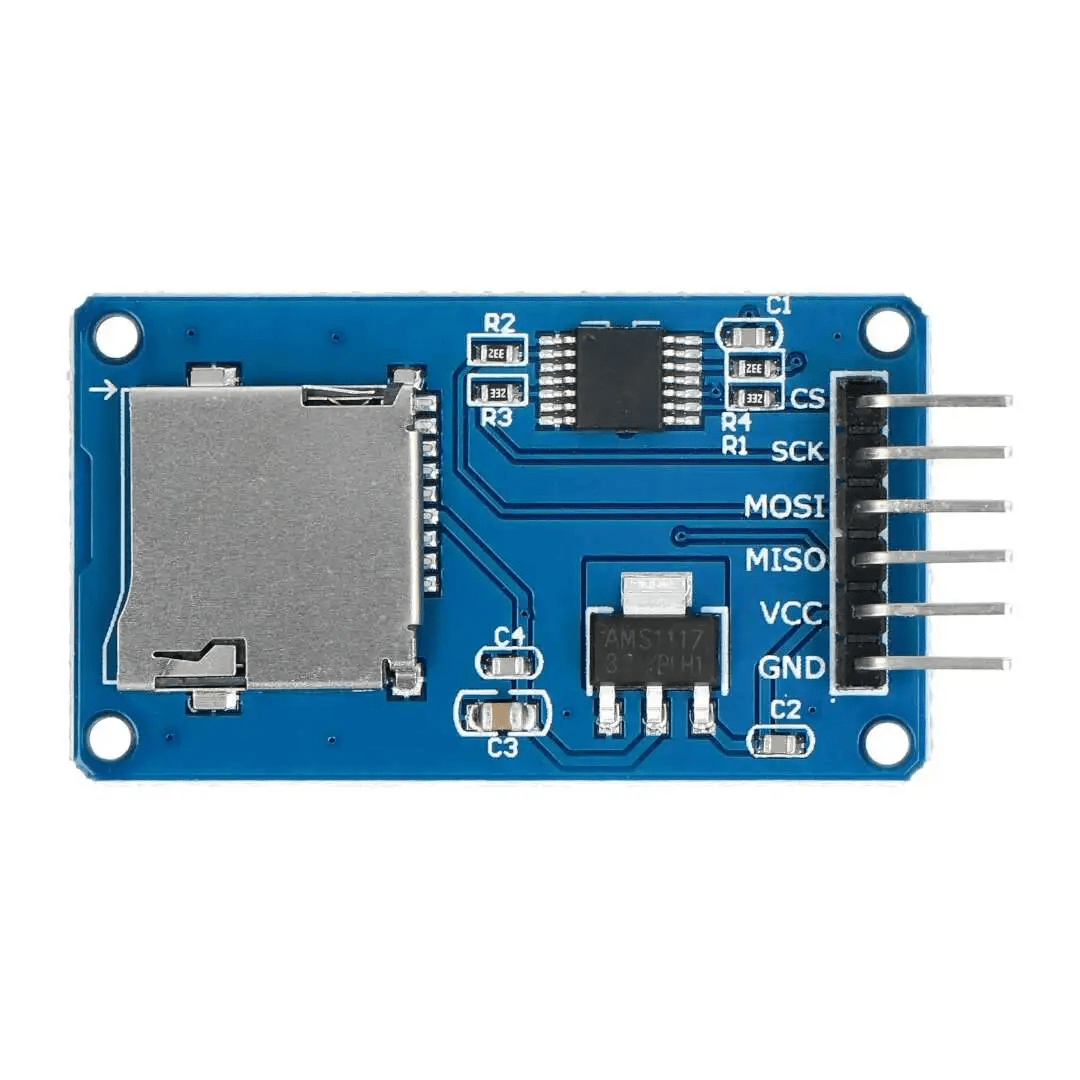
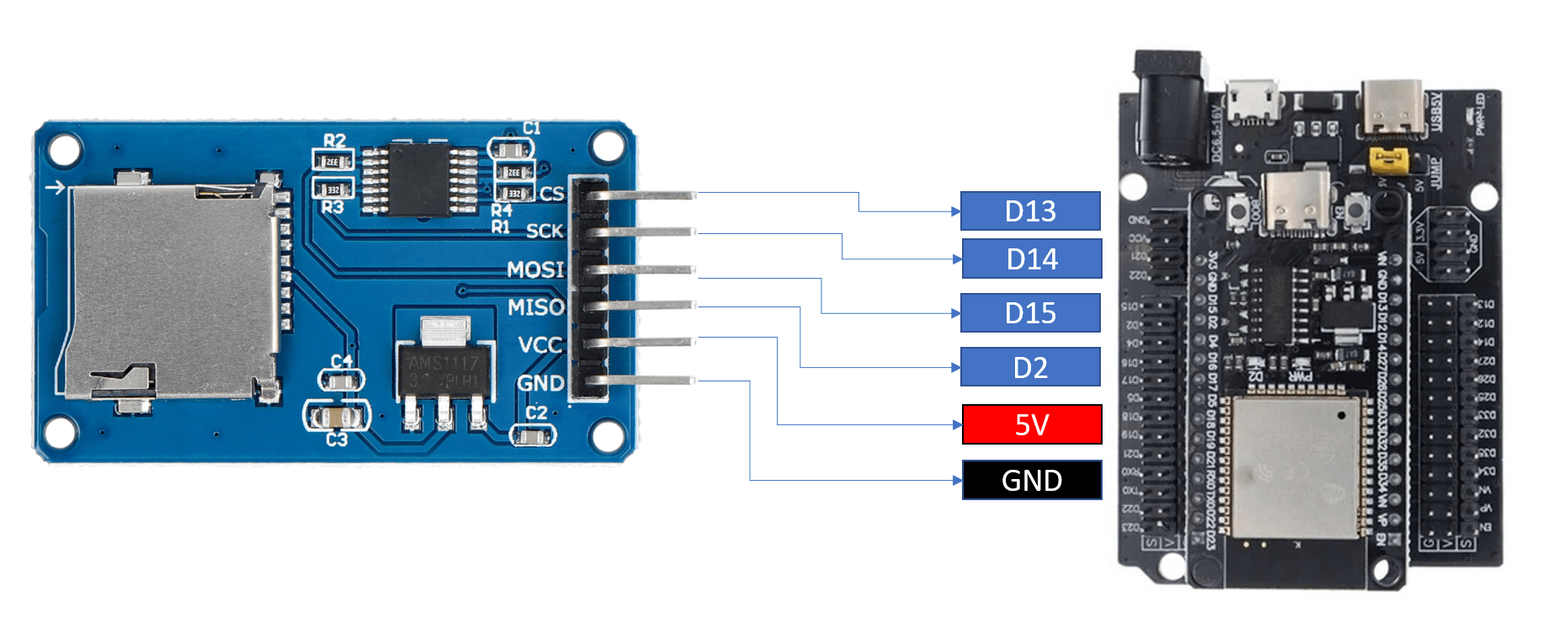
An SD card module is a hardware device that allows a microcontroller (like ESP32) to store and retrieve data on a microSD card.
SD Card Module
Motor Driver
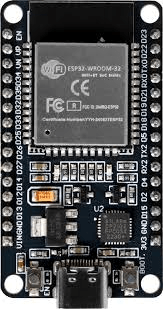
ESP32
SD Card Module
ESP32 sends instructions like:
- Open file
- Write data
- Read data
The SD card module receives signals
- The SD card saves data in files (like .txt or .csv)
- Data is written line by line
Write Data
Read Data
ESP32
- Output Voltage is only 3.3V
- Max Current from the pin ~12mA
Connection
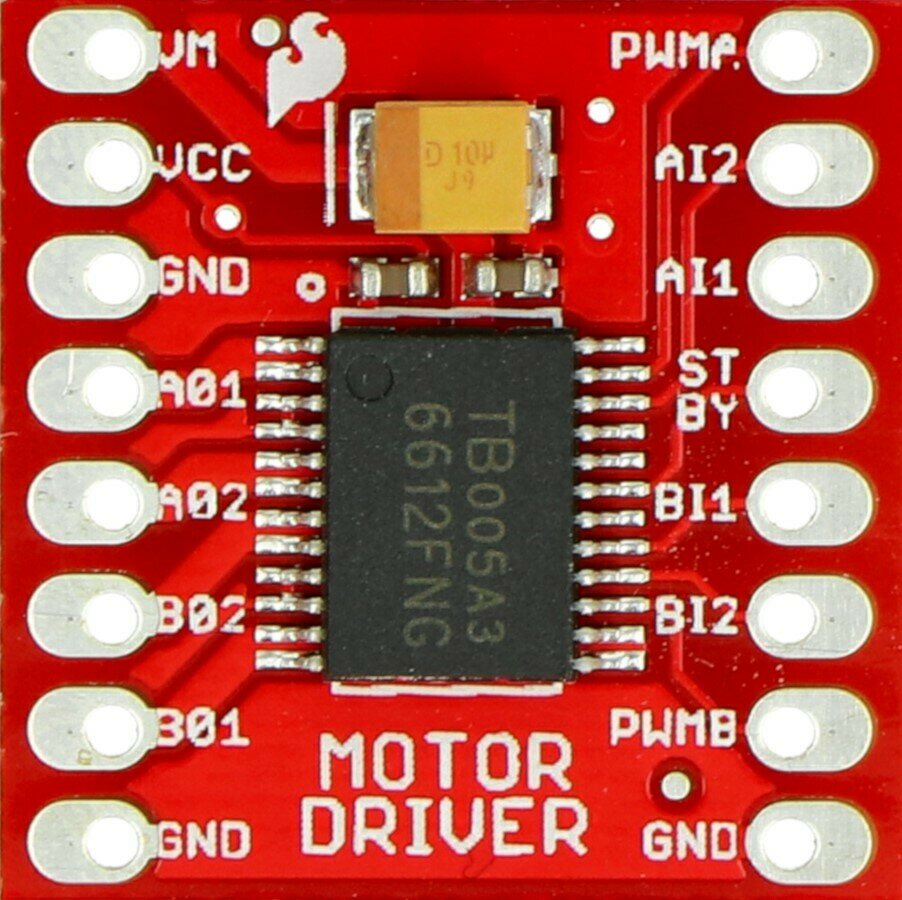
TB6612
ESP32
- Output Voltage is only 3.3V
- Max Current from the pin ~12mA
SD Card Library
L298N
from micropython import const
import time


_CMD_TIMEOUT = const(100)

_R1_IDLE_STATE = const(1 << 0)
# R1_ERASE_RESET = const(1 << 1)
_R1_ILLEGAL_COMMAND = const(1 << 2)
# R1_COM_CRC_ERROR = const(1 << 3)
# R1_ERASE_SEQUENCE_ERROR = const(1 << 4)
# R1_ADDRESS_ERROR = const(1 << 5)
# R1_PARAMETER_ERROR = const(1 << 6)
_TOKEN_CMD25 = const(0xFC)
_TOKEN_STOP_TRAN = const(0xFD)
_TOKEN_DATA = const(0xFE)


class SDCard:
    def __init__(self, spi, cs, baudrate=1320000):
        self.spi = spi
        self.cs = cs

        self.cmdbuf = bytearray(6)
        self.dummybuf = bytearray(512)
        self.tokenbuf = bytearray(1)
        for i in range(512):
            self.dummybuf[i] = 0xFF
        self.dummybuf_memoryview = memoryview(self.dummybuf)

        # initialise the card
        self.init_card(baudrate)

    def init_spi(self, baudrate):
        try:
            master = self.spi.MASTER
        except AttributeError:
            # on ESP8266
            self.spi.init(baudrate=baudrate, phase=0, polarity=0)
        else:
            # on pyboard
            self.spi.init(master, baudrate=baudrate, phase=0, polarity=0)

    def init_card(self, baudrate):

        # init CS pin
        self.cs.init(self.cs.OUT, value=1)

        # init SPI bus; use low data rate for initialisation
        self.init_spi(100000)

        # clock card at least 100 cycles with cs high
        for i in range(16):
            self.spi.write(b"\xff")

        # CMD0: init card; should return _R1_IDLE_STATE (allow 5 attempts)
        for _ in range(5):
            if self.cmd(0, 0, 0x95) == _R1_IDLE_STATE:
                break
        else:
            raise OSError("no SD card")

        # CMD8: determine card version
        r = self.cmd(8, 0x01AA, 0x87, 4)
        if r == _R1_IDLE_STATE:
            self.init_card_v2()
        elif r == (_R1_IDLE_STATE | _R1_ILLEGAL_COMMAND):
            self.init_card_v1()
        else:
            raise OSError("couldn't determine SD card version")

        # get the number of sectors
        # CMD9: response R2 (R1 byte + 16-byte block read)
        if self.cmd(9, 0, 0, 0, False) != 0:
            raise OSError("no response from SD card")
        csd = bytearray(16)
        self.readinto(csd)
        if csd[0] & 0xC0 == 0x40:  # CSD version 2.0
            self.sectors = ((csd[8] << 8 | csd[9]) + 1) * 1024
        elif csd[0] & 0xC0 == 0x00:  # CSD version 1.0 (old, <=2GB)
            c_size = (csd[6] & 0b11) << 10 | csd[7] << 2 | csd[8] >> 6
            c_size_mult = (csd[9] & 0b11) << 1 | csd[10] >> 7
            read_bl_len = csd[5] & 0b1111
            capacity = (c_size + 1) * (2 ** (c_size_mult + 2)) * (2**read_bl_len)
            self.sectors = capacity // 512
        else:
            raise OSError("SD card CSD format not supported")
        # print('sectors', self.sectors)

        # CMD16: set block length to 512 bytes
        if self.cmd(16, 512, 0) != 0:
            raise OSError("can't set 512 block size")

        # set to high data rate now that it's initialised
        self.init_spi(baudrate)

    def init_card_v1(self):
        for i in range(_CMD_TIMEOUT):
            self.cmd(55, 0, 0)
            if self.cmd(41, 0, 0) == 0:
                # SDSC card, uses byte addressing in read/write/erase commands
                self.cdv = 512
                # print("[SDCard] v1 card")
                return
        raise OSError("timeout waiting for v1 card")

    def init_card_v2(self):
        for i in range(_CMD_TIMEOUT):
            time.sleep_ms(50)
            self.cmd(58, 0, 0, 4)
            self.cmd(55, 0, 0)
            if self.cmd(41, 0x40000000, 0) == 0:
                self.cmd(58, 0, 0, -4)  # 4-byte response, negative means keep the first byte
                ocr = self.tokenbuf[0]  # get first byte of response, which is OCR
                if not ocr & 0x40:
                    # SDSC card, uses byte addressing in read/write/erase commands
                    self.cdv = 512
                else:
                    # SDHC/SDXC card, uses block addressing in read/write/erase commands
                    self.cdv = 1
                # print("[SDCard] v2 card")
                return
        raise OSError("timeout waiting for v2 card")

    def cmd(self, cmd, arg, crc, final=0, release=True, skip1=False):
        self.cs(0)

        # create and send the command
        buf = self.cmdbuf
        buf[0] = 0x40 | cmd
        buf[1] = arg >> 24
        buf[2] = arg >> 16
        buf[3] = arg >> 8
        buf[4] = arg
        buf[5] = crc
        self.spi.write(buf)

        if skip1:
            self.spi.readinto(self.tokenbuf, 0xFF)

        # wait for the response (response[7] == 0)
        for i in range(_CMD_TIMEOUT):
            self.spi.readinto(self.tokenbuf, 0xFF)
            response = self.tokenbuf[0]
            if not (response & 0x80):
                # this could be a big-endian integer that we are getting here
                # if final<0 then store the first byte to tokenbuf and discard the rest
                if final < 0:
                    self.spi.readinto(self.tokenbuf, 0xFF)
                    final = -1 - final
                for j in range(final):
                    self.spi.write(b"\xff")
                if release:
                    self.cs(1)
                    self.spi.write(b"\xff")
                return response

        # timeout
        self.cs(1)
        self.spi.write(b"\xff")
        return -1

    def readinto(self, buf):
        self.cs(0)

        # read until start byte (0xff)
        for i in range(_CMD_TIMEOUT):
            self.spi.readinto(self.tokenbuf, 0xFF)
            if self.tokenbuf[0] == _TOKEN_DATA:
                break
            time.sleep_ms(1)
        else:
            self.cs(1)
            raise OSError("timeout waiting for response")

        # read data
        mv = self.dummybuf_memoryview
        if len(buf) != len(mv):
            mv = mv[: len(buf)]
        self.spi.write_readinto(mv, buf)

        # read checksum
        self.spi.write(b"\xff")
        self.spi.write(b"\xff")

        self.cs(1)
        self.spi.write(b"\xff")

    def write(self, token, buf):
        self.cs(0)

        # send: start of block, data, checksum
        self.spi.read(1, token)
        self.spi.write(buf)
        self.spi.write(b"\xff")
        self.spi.write(b"\xff")

        # check the response
        if (self.spi.read(1, 0xFF)[0] & 0x1F) != 0x05:
            self.cs(1)
            self.spi.write(b"\xff")
            return

        # wait for write to finish
        while self.spi.read(1, 0xFF)[0] == 0:
            pass

        self.cs(1)
        self.spi.write(b"\xff")

    def write_token(self, token):
        self.cs(0)
        self.spi.read(1, token)
        self.spi.write(b"\xff")
        # wait for write to finish
        while self.spi.read(1, 0xFF)[0] == 0x00:
            pass

        self.cs(1)
        self.spi.write(b"\xff")

    def readblocks(self, block_num, buf):
        nblocks = len(buf) // 512
        assert nblocks and not len(buf) % 512, "Buffer length is invalid"
        if nblocks == 1:
            # CMD17: set read address for single block
            if self.cmd(17, block_num * self.cdv, 0, release=False) != 0:
                # release the card
                self.cs(1)
                raise OSError(5)  # EIO
            # receive the data and release card
            self.readinto(buf)
        else:
            # CMD18: set read address for multiple blocks
            if self.cmd(18, block_num * self.cdv, 0, release=False) != 0:
                # release the card
                self.cs(1)
                raise OSError(5)  # EIO
            offset = 0
            mv = memoryview(buf)
            while nblocks:
                # receive the data and release card
                self.readinto(mv[offset : offset + 512])
                offset += 512
                nblocks -= 1
            if self.cmd(12, 0, 0xFF, skip1=True):
                raise OSError(5)  # EIO

    def writeblocks(self, block_num, buf):
        nblocks, err = divmod(len(buf), 512)
        assert nblocks and not err, "Buffer length is invalid"
        if nblocks == 1:
            # CMD24: set write address for single block
            if self.cmd(24, block_num * self.cdv, 0) != 0:
                raise OSError(5)  # EIO

            # send the data
            self.write(_TOKEN_DATA, buf)
        else:
            # CMD25: set write address for first block
            if self.cmd(25, block_num * self.cdv, 0) != 0:
                raise OSError(5)  # EIO
            # send the data
            offset = 0
            mv = memoryview(buf)
            while nblocks:
                self.write(_TOKEN_CMD25, mv[offset : offset + 512])
                offset += 512
                nblocks -= 1
            self.write_token(_TOKEN_STOP_TRAN)

    def ioctl(self, op, arg):
        if op == 4:  # get number of blocks
            return self.sectors
        if op == 5:  # get block size in bytes
            return 512
save this code as sdcard.py in the micropython device
ESP32
- Output Voltage is only 3.3V
- Max Current from the pin ~12mA
SD Card Coding
L298N
from machine import Pin, SPI
import os
import sdcard

spi = SPI(1, baudrate=1000000,
          sck=Pin(14), mosi=Pin(15), miso=Pin(2))

cs = Pin(13)

print("Initializing SD card...")

sd = sdcard.SDCard(spi, cs)
vfs = os.VfsFat(sd)
os.mount(vfs, "/sd")

print("Mounted OK")

# Write file
with open("/sd/test.txt", "w") as f:
    f.write("Hello everyone!")

print("Write done")

os.umount("/sd")
print("Unmounted")
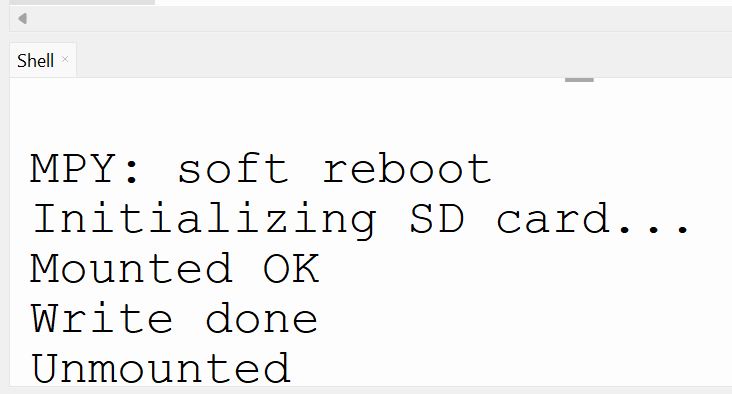
SD Card Writing
If successful, you will see this
from machine import Pin, SPI
import os
import sdcard

# Setup SPI
spi = SPI(1, baudrate=1000000,
          sck=Pin(14), mosi=Pin(15), miso=Pin(2))

cs = Pin(13)

print("Initializing SD card...")

# Mount
sd = sdcard.SDCard(spi, cs)
vfs = os.VfsFat(sd)
os.mount(vfs, "/sd")

print("Mounted OK")
print("Files:", os.listdir("/sd"))

with open("/sd/test.txt", "r") as f:
    print("Content:", f.read())

os.umount("/sd")
print("Unmounted")
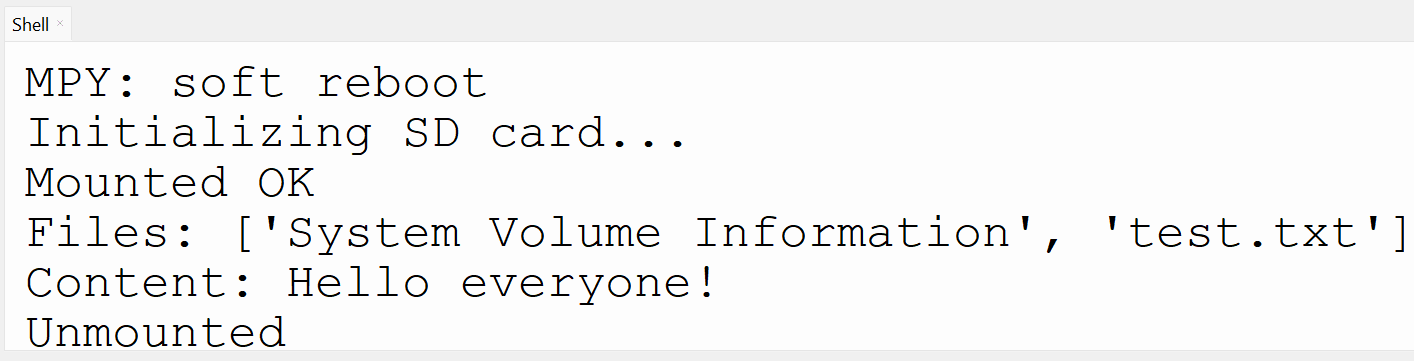
SD Card Reading
Data Reading from SD Card
Google Firestore
Google Firestore
- Cloud Firestore is a NoSQL document-oriented database that stores data in the form of documents organized into collections.
- Each document can contain multiple fields, and the data type of each field can be any of the supported data types.

Data is stored in the cloud and can be accessed anytime, anywhere
Google Firestore
Firestore Characteristic:
- Real-time updates
- No server needed
- Easy to use API
- Scalable (small → large system)
Example
- Temperature monitoring
- RFID attendance
- Smart home control
Firestore Structure
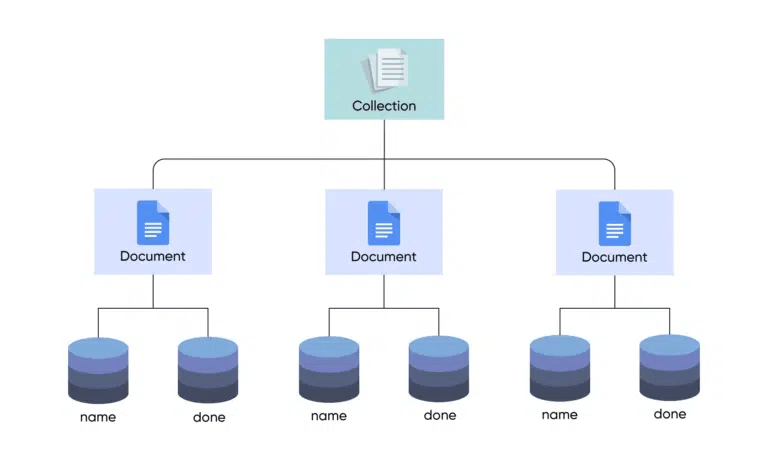
In Cloud Firestore, you can define the structure of your data by creating collections and documents and specifying the fields and data types of each record. You can also create subcollections within documents to further organize your data.
Folder
File
Data
Cloud Firestore

Click on this link
Log in with your google account and Go to Console
Cloud Firestore
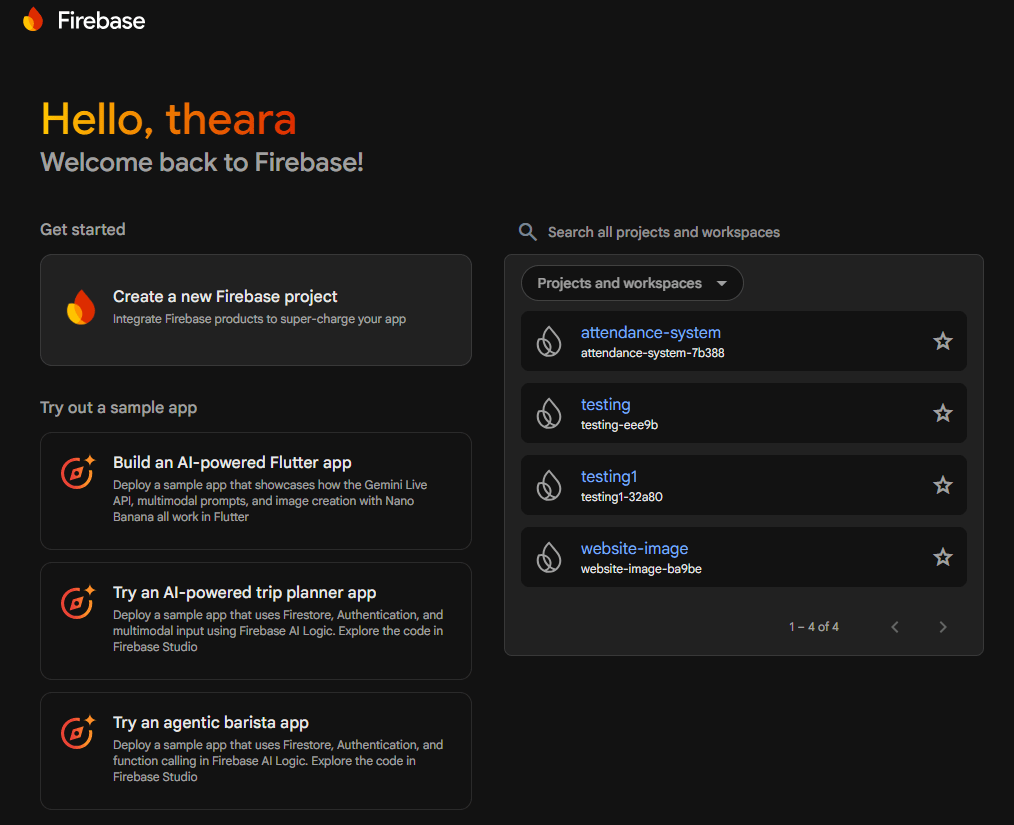
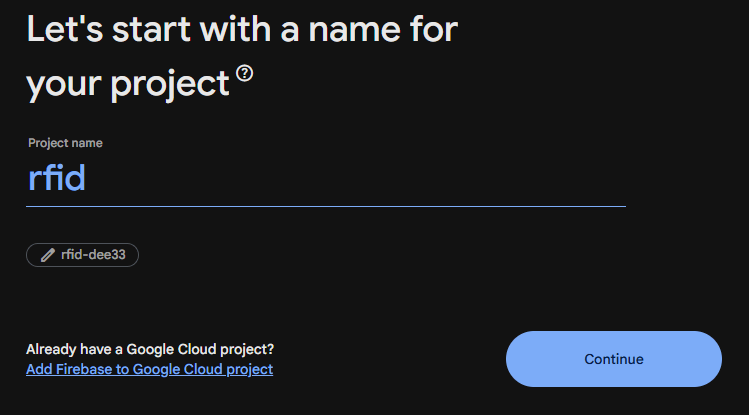

Create a new project
Give a project name
Select Default Account and Create project
Cloud Firestore
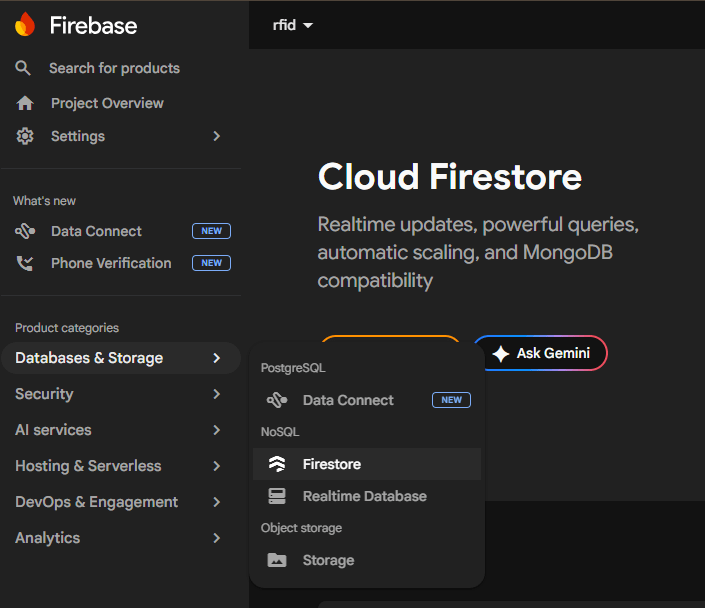
Go database -> Firestore
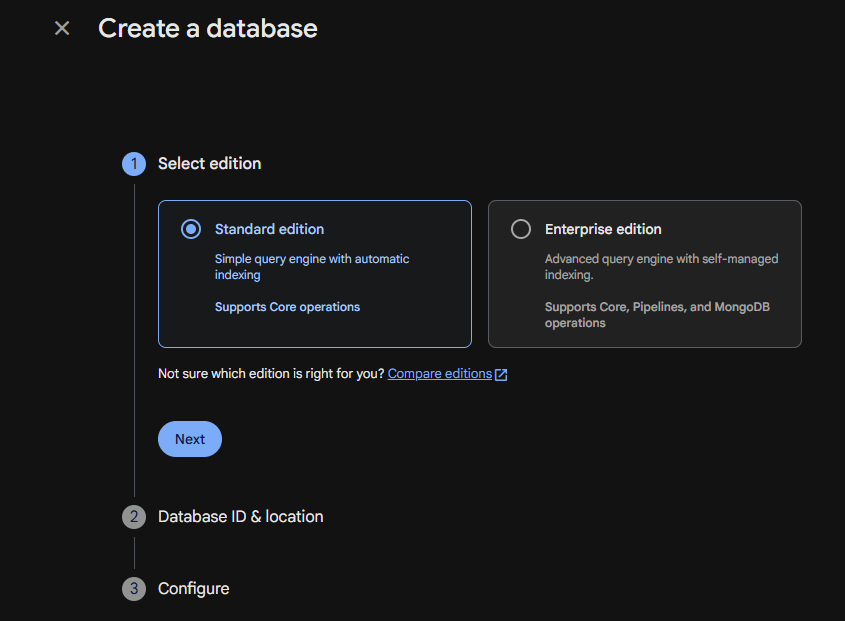
then create Database with everything defualt
Firestore ID
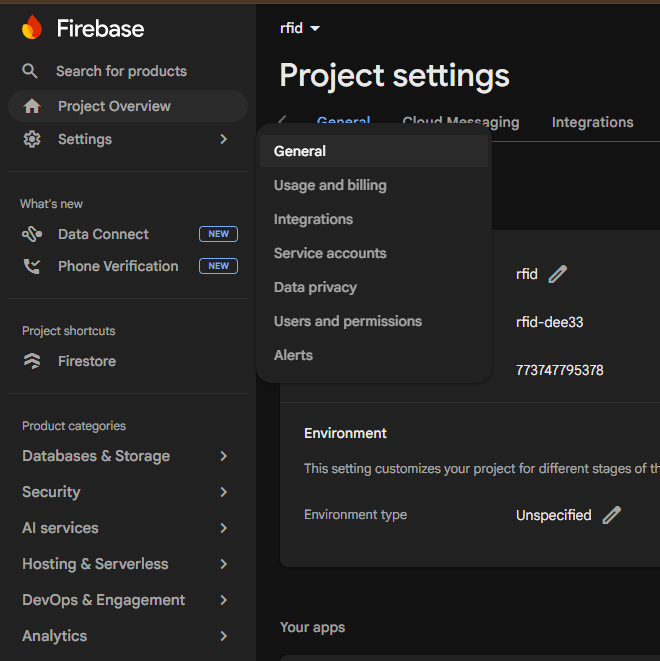
Go to Settings->General
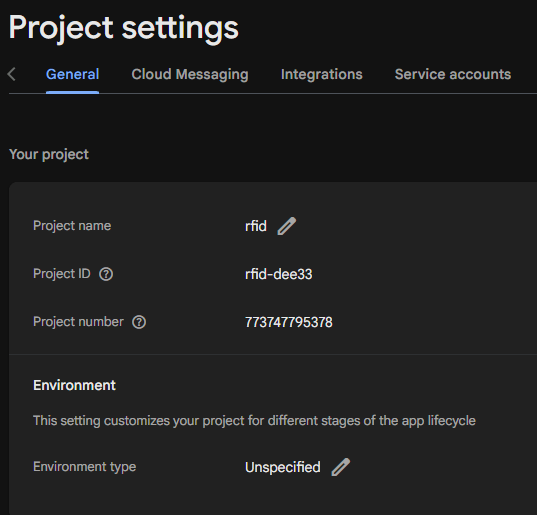
This is your project ID
Firestore Coding
from machine import Pin, SPI
from mfrc522 import MFRC522
import network
import urequests
import ujson
import time


SSID = "SSID"
PASSWORD = "password"

wifi = network.WLAN(network.STA_IF)
wifi.active(True)
wifi.connect(SSID, PASSWORD)

print("Connecting WiFi", end="")
while not wifi.isconnected():
    print(".", end="")
    time.sleep(0.5)

print("\nConnected:", wifi.ifconfig())

PROJECT_ID = "firestore-ID"

url = "https://firestore.googleapis.com/v1/projects/{}/databases/(default)/documents/rfid_logs".format(PROJECT_ID)


spi = SPI(1, baudrate=1000000,
          sck=Pin(18), mosi=Pin(23), miso=Pin(19))

rdr = MFRC522(spi=spi, gpioRst=Pin(22), gpioCs=Pin(16))

print("Scan RFID...")

def send_to_firestore(uid):
    data = {
        "fields": {
            "uid": {"stringValue": uid},
            "time": {"stringValue": str(time.time())}
        }
    }

    try:
        res = urequests.post(url, json=data)
        print("Sent:", res.text)
        res.close()
    except Exception as e:
        print("Error sending:", e)


while True:
    (stat, tag_type) = rdr.request(rdr.REQIDL)

    if stat == rdr.OK:
        (stat, uid) = rdr.anticoll()

        if stat == rdr.OK:
            uid_str = "".join([str(i) for i in uid])
            print("UID:", uid_str)

            send_to_firestore(uid_str)

            time.sleep(2)
In this code, we want to send the data of the RFID to the Firestore
Firestore Coding
from machine import Pin, SPI
from mfrc522 import MFRC522
import network
import urequests
import ujson
import time


SSID = "SSID"
PASSWORD = "password"

wifi = network.WLAN(network.STA_IF)
wifi.active(True)
wifi.connect(SSID, PASSWORD)

print("Connecting WiFi", end="")
while not wifi.isconnected():
    print(".", end="")
    time.sleep(0.5)

print("\nConnected:", wifi.ifconfig())

PROJECT_ID = "firestore-ID"

url = "https://firestore.googleapis.com/v1/projects/{}/databases/(default)/documents/rfid_logs".format(PROJECT_ID)


spi = SPI(1, baudrate=1000000,
          sck=Pin(18), mosi=Pin(23), miso=Pin(19))

rdr = MFRC522(spi=spi, gpioRst=Pin(22), gpioCs=Pin(16))

print("Scan RFID...")

def send_to_firestore(uid):
    data = {
        "fields": {
            "uid": {"stringValue": uid},
            "time": {"stringValue": str(time.time())}
        }
    }

    try:
        res = urequests.post(url, json=data)
        print("Sent:", res.text)
        res.close()
    except Exception as e:
        print("Error sending:", e)


while True:
    (stat, tag_type) = rdr.request(rdr.REQIDL)

    if stat == rdr.OK:
        (stat, uid) = rdr.anticoll()

        if stat == rdr.OK:
            uid_str = "".join([str(i) for i in uid])
            print("UID:", uid_str)

            send_to_firestore(uid_str)

            time.sleep(2)
In this code, we want to send the data of the RFID to the Firestore
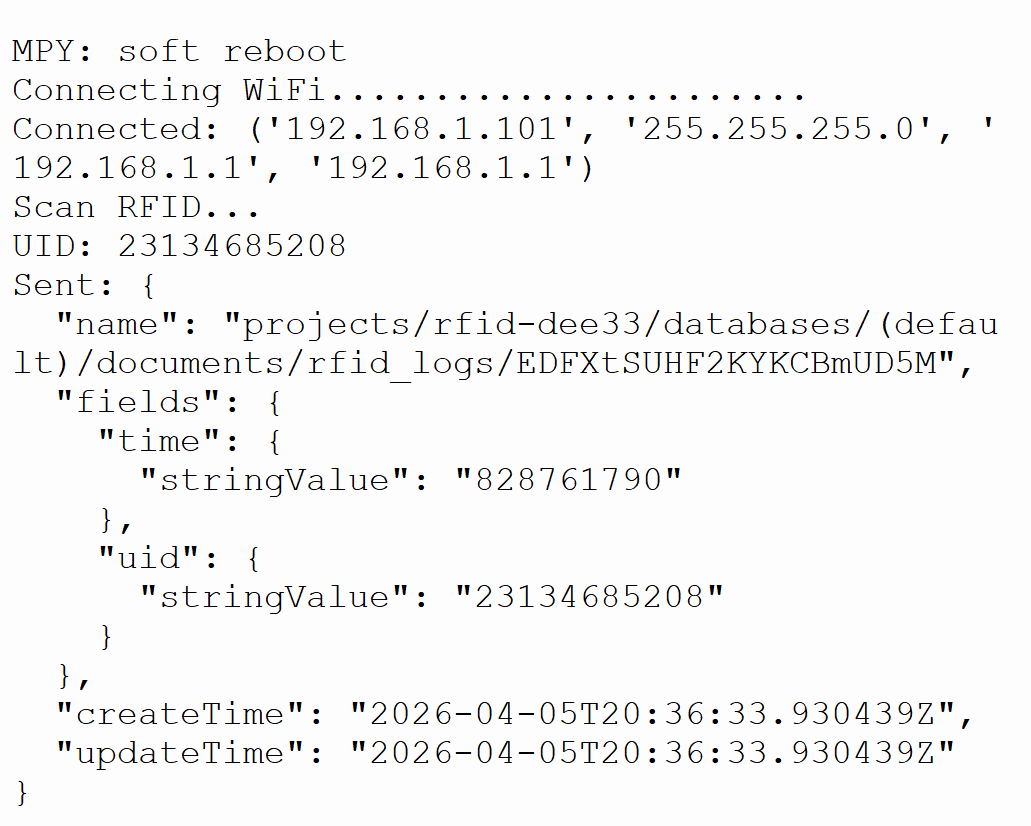
After we put the tag/card on the RFID, it will send to the Firestore as shown in here
Firestore Data
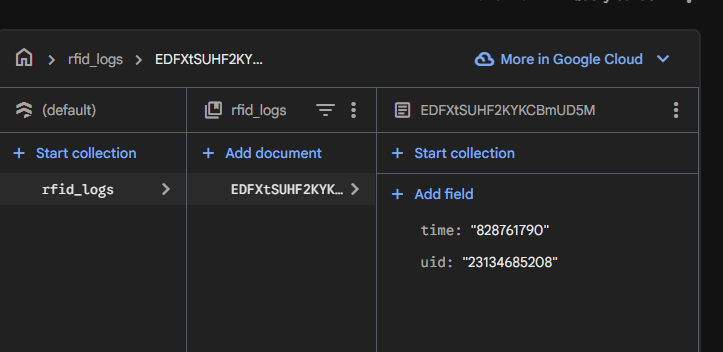
After successfully publish, you will see the data in the Firestore