
Fashion Mnist Logistic Regression
Published:
Fashion-MNIST Classification using PyTorch: A Complete Multiclass Logistic Regression Project
1. Introduction
In the previous breast-cancer project, we used numerical measurements to predict one of two classes: malignant or benign.
In this project, we move to multiclass image classification. We give the model an image of a clothing item and ask it to choose one of ten categories, such as a shirt, a bag, or a sneaker.
We use multiclass logistic regression, also called softmax regression. The model contains one linear layer and no hidden layers. This makes it useful for understanding how pixels become input features, how a model produces class scores, and how those scores become probabilities.
Despite the word “regression,” logistic regression is used here for classification. We are choosing a category, not predicting a continuous quantity such as a price.
This project covers downloading data, preparing inputs, training with mini-batches, evaluating predictions, plotting results, and saving model weights.
2. Project Goal
Given a 28 × 28 grayscale image, predict the clothing category.
For example:
| Input image | Desired output |
|---|---|
| A trouser | Trouser |
| A bag | Bag |
| A sneaker | Sneaker |
The model receives 784 pixel values, because:
\[28 \times 28 = 784\]It produces ten scores, one for each category. We select the category with the highest score.
This is classification of an already framed image. The model does not locate multiple clothing items inside a larger photograph.
3. Dataset Overview
We use Fashion-MNIST on Kaggle, published by Zalando Research.
| Item | Value |
|---|---|
| Training images | 60,000 |
| Test images | 10,000 |
| Image size | 28 × 28 pixels |
| Color channels | 1, grayscale |
| Input features | 784 |
| Classes | 10 |
| Columns in each CSV | 785: one label plus 784 pixels |
Although we read CSV files, the inputs represent images. Each row stores one image as pixel values rather than as a separate image file.
The two files used are:
fashion-mnist_train.csvfashion-mnist_test.csv
The dataset already provides separate training and test sets.
4. Class Labels
The label is an integer identifying the correct category.
| Label | Category |
|---|---|
| 0 | T-shirt/top |
| 1 | Trouser |
| 2 | Pullover |
| 3 | Dress |
| 4 | Coat |
| 5 | Sandal |
| 6 | Shirt |
| 7 | Sneaker |
| 8 | Bag |
| 9 | Ankle boot |
These numbers are category identifiers. A label of 8 does not mean a bag is “larger” than a shoe labeled 7.
CLASS_NAMES[8] returns "Bag". Keep this order unchanged when training, evaluating, or loading the model later.
5. Project Workflow
- Download Fashion-MNIST from Kaggle.
- Read the training and test CSV files.
- Separate pixel inputs from class labels.
- Validate the data and scale pixels to 0–1.
- Convert inputs and labels to PyTorch tensors.
- Create mini-batches with DataLoader.
- Train a single linear layer using cross-entropy loss.
- Evaluate on the test set.
- Plot the loss, confusion matrix, ROC curves, and sample predictions.
- Compare accuracy with a simple baseline and save the weights.
6. Project Files and Installation
Create two files in the same folder:
| File | Purpose |
|---|---|
data_prep.py | Download, validate, and prepare the data |
train_multiclass.py | Train, evaluate, visualize, and save the model |
For a new Python environment, install:
python -m pip install torch kagglehub numpy pandas matplotlib seaborn scikit-learn
If PyTorch already works with your NVIDIA GPU, keep that installation and install only the missing packages.
Run the commands from your project folder:
python data_prep.py
python train_multiclass.py
The first command checks the data preparation. The second also imports and runs data preparation automatically, so it can be used directly after setup.
7. Data Preparation File: data_prep.py
Full code:
#%% Packages
from pathlib import Path

import kagglehub
import numpy as np
import pandas as pd

# =============================================================================
# PROJECT DIRECTORY
# =============================================================================
BASE_DIR = Path(__file__).resolve().parent

# =============================================================================
# DOWNLOAD KAGGLE DATASET
# =============================================================================
# The first run downloads the dataset.
# Later runs reuse the cached files when available.
DATA_DIR = Path(
    kagglehub.dataset_download("zalando-research/fashionmnist")
)
print("Dataset folder:", DATA_DIR)

# =============================================================================
# CLASS NAMES
# =============================================================================
CLASS_NAMES = [
    "T-shirt/top",  # 0
    "Trouser",     # 1
    "Pullover",    # 2
    "Dress",       # 3
    "Coat",        # 4
    "Sandal",      # 5
    "Shirt",       # 6
    "Sneaker",     # 7
    "Bag",         # 8
    "Ankle boot"   # 9
]

# =============================================================================
# LOAD CSV FUNCTION
# =============================================================================
def load_csv(filename):
    file_path = DATA_DIR / filename
    if not file_path.is_file():
        raise FileNotFoundError(f"Could not find dataset file: {file_path}")

    dataframe = pd.read_csv(file_path)
    # Each row should contain one label and 784 pixel values.
    if "label" not in dataframe.columns or dataframe.shape[1] != 785:
        raise ValueError(
            f"{filename} must contain a label column and 784 pixel columns."
        )
    if dataframe.empty:
        raise ValueError(f"{filename} contains no data.")
    if not dataframe["label"].isin(range(10)).all():
        raise ValueError(f"{filename} contains invalid class labels.")

    pixel_columns = dataframe.drop(columns="label")
    X = pixel_columns.to_numpy(dtype=np.float32)
    y = dataframe["label"].astype("int64")

    if not np.isfinite(X).all() or X.min() < 0 or X.max() > 255:
        raise ValueError(
            f"{filename} must contain pixel values from 0 to 255 "
            "with no missing or infinite values."
        )
    X = X / 255.0
    return X, y, pixel_columns.columns

# =============================================================================
# PREPARE TRAINING AND TEST DATA
# =============================================================================
X_train, y_train, train_columns = load_csv("fashion-mnist_train.csv")
X_test, y_test, test_columns = load_csv("fashion-mnist_test.csv")

if not train_columns.equals(test_columns):
    raise ValueError("Training and test pixel columns must have the same order.")

# =============================================================================
# DISPLAY DATASET INFORMATION
# =============================================================================
if __name__ == "__main__":
    print("\nDataset Shapes")
    print("X_train:", X_train.shape)
    print("X_test :", X_test.shape)
    print("y_train:", y_train.shape)
    print("y_test :", y_test.shape)

    print("\nTraining Pixel Range")
    print("Minimum:", X_train.min())
    print("Maximum:", X_train.max())

    print("\nTraining Class Distribution")
    counts = y_train.value_counts().sort_index()
    for class_id, count in counts.items():
        print(f"{class_id}: {CLASS_NAMES[class_id]:12s} {count} images")
8. Explaining the Packages and Paths
| Package | Purpose |
|---|---|
pathlib | Build file paths relative to the script |
kagglehub | Download the dataset and manage the local cache |
numpy | Store numerical pixel arrays |
pandas | Read CSV tables and work with labels |
BASE_DIR = Path(__file__).resolve().parent
This finds the folder containing the script. Training results are saved under this project folder, even when Python is launched from another working directory.
DATA_DIR = Path(
    kagglehub.dataset_download("zalando-research/fashionmnist")
)
This obtains the downloaded dataset folder. KaggleHub uses its cache when available; the dataset does not need to be copied manually into the project.
BASE_DIR is the project location, while DATA_DIR is the dataset location. They can be different folders.
9. Reading and Validating the CSV Files
dataframe = pd.read_csv(file_path)
This loads a CSV file as a table.
Before training, the function checks that the file exists, the table is not empty, a label column is present, there are 784 other columns, and the labels belong to 0–9.
It also checks that pixels are finite and lie between 0 and 255. These checks help reveal an incorrect file or unexpected data format before training starts.
10. Creating Inputs X and Labels y
pixel_columns = dataframe.drop(columns="label")
X = pixel_columns.to_numpy(dtype=np.float32)
y = dataframe["label"].astype("int64")
Xcontains the pixel values.ycontains the correct class for each image.
The label is removed from the inputs because it is the answer the model must learn to predict.
The expected shapes are:
| Variable | Shape | Meaning |
|---|---|---|
X_train | (60000, 784) | 60,000 training images, each with 784 pixels |
y_train | (60000,) | One label per training image |
X_test | (10000, 784) | 10,000 test images |
y_test | (10000,) | One label per test image |
The CSV already contains flattened pixels. We do not need a Flatten layer in the model.
11. Scaling the Pixel Values
X = X / 255.0
This rescales inputs from 0–255 to 0–1:
| Original pixel | Scaled pixel |
|---|---|
| 0 | 0.000 |
| 128 | About 0.502 |
| 255 | 1.000 |
Here, 0 represents black and 1 represents white in the displayed grayscale image.
Unlike a fitted StandardScaler, division by 255 does not learn any statistics from the dataset. We therefore do not need to save a scaler file. Future images must receive this same scaling.
12. Training and Test Sets
The training set is used to update the weights. The test set is used to evaluate the trained model.
We use the supplied split rather than combining the files and splitting again.
if not train_columns.equals(test_columns):
    raise ValueError(...)
This checks that corresponding pixel columns have the same names and order. A model trained with one pixel ordering must receive that ordering during testing and prediction.
The if __name__ == "__main__": block prints additional dataset information only when data_prep.py is run directly. Loading and preparation still happen when the training script imports it.
13. Training File: train_multiclass.py
Full code:
#%% Packages
import numpy as np
import torch
import torch.nn as nn
import torch.optim as optim
from torch.utils.data import TensorDataset, DataLoader
import matplotlib.pyplot as plt
import seaborn as sns
from sklearn.metrics import (
    confusion_matrix, accuracy_score, classification_report, roc_curve, auc
)
from sklearn.dummy import DummyClassifier
from data_prep import X_train, X_test, y_train, y_test, CLASS_NAMES, BASE_DIR

# =============================================================================
# HYPERPARAMETERS
# =============================================================================
torch.manual_seed(42)
BATCH_SIZE = 64
LEARNING_RATE = 0.0005
EPOCHS = 40
DEVICE = torch.device("cuda" if torch.cuda.is_available() else "cpu")
OUTPUT_DIR = BASE_DIR / "outputs"
OUTPUT_DIR.mkdir(exist_ok=True)
print("Device:", DEVICE)

# =============================================================================
# DATASET
# =============================================================================
train_dataset = TensorDataset(
    torch.tensor(X_train, dtype=torch.float32),
    torch.tensor(y_train.values, dtype=torch.long)
)
test_dataset = TensorDataset(
    torch.tensor(X_test, dtype=torch.float32),
    torch.tensor(y_test.values, dtype=torch.long)
)
train_loader = DataLoader(train_dataset, batch_size=BATCH_SIZE, shuffle=True)
test_loader = DataLoader(test_dataset, batch_size=BATCH_SIZE, shuffle=False)

# =============================================================================
# MODEL: MULTICLASS LOGISTIC REGRESSION
# =============================================================================
class FashionLogisticRegression(nn.Module):
    def __init__(self, input_size, num_classes):
        super().__init__()
        # One linear layer: no hidden layers or ReLU.
        self.linear = nn.Linear(input_size, num_classes)

    def forward(self, x):
        return self.linear(x)


# =============================================================================
# CREATE MODEL
# =============================================================================
INPUT_SIZE = X_train.shape[1]
NUM_CLASSES = len(CLASS_NAMES)
model = FashionLogisticRegression(INPUT_SIZE, NUM_CLASSES).to(DEVICE)
print(model)

# =============================================================================
# LOSS FUNCTION
# =============================================================================
# Pass raw logits to CrossEntropyLoss, not softmax probabilities.
loss_fn = nn.CrossEntropyLoss()
optimizer = optim.Adam(model.parameters(), lr=LEARNING_RATE, weight_decay=0.0001)

# =============================================================================
# TRAINING
# =============================================================================
train_losses = []
for epoch in range(EPOCHS):
    model.train()
    running_loss = 0.0
    for X_batch, y_batch in train_loader:
        X_batch = X_batch.to(DEVICE)
        y_batch = y_batch.to(DEVICE)
        optimizer.zero_grad()
        logits = model(X_batch)
        # logits: [batch size, 10]; labels: [batch size].
        loss = loss_fn(logits, y_batch)
        loss.backward()
        optimizer.step()
        running_loss += loss.item() * X_batch.size(0)
    avg_loss = running_loss / len(train_dataset)
    train_losses.append(avg_loss)
    print(f"Epoch [{epoch + 1:02d}/{EPOCHS}] Loss: {avg_loss:.4f}")

# =============================================================================
# LOSS CURVE
# =============================================================================
plt.figure(figsize=(8, 5))
plt.plot(range(1, EPOCHS + 1), train_losses, marker="o")
plt.xlabel("Epoch")
plt.ylabel("Training loss")
plt.title("Fashion-MNIST: Multiclass Logistic Regression")
plt.grid(True)
plt.tight_layout()
plt.savefig(OUTPUT_DIR / "training_loss.png", dpi=150)
plt.show()
plt.close()

# =============================================================================
# EVALUATION
# =============================================================================
model.eval()
y_true, y_pred, y_prob = [], [], []
with torch.no_grad():
    for X_batch, y_batch in test_loader:
        X_batch = X_batch.to(DEVICE)
        logits = model(X_batch)
        probabilities = torch.softmax(logits, dim=1)
        predictions = probabilities.argmax(dim=1)
        y_true.extend(y_batch.numpy())
        y_pred.extend(predictions.cpu().numpy())
        # Keep all 10 probabilities per image; do not flatten them.
        y_prob.extend(probabilities.cpu().numpy())
y_true = np.asarray(y_true)
y_pred = np.asarray(y_pred)
y_prob = np.asarray(y_prob)

# =============================================================================
# ACCURACY AND REPORT
# =============================================================================
accuracy = accuracy_score(y_true, y_pred)
print(f"\nTest accuracy: {accuracy:.2%}")
report = classification_report(
    y_true, y_pred, labels=list(range(NUM_CLASSES)),
    target_names=CLASS_NAMES, zero_division=0
)
print("\nClassification report\n", report)

# =============================================================================
# CONFUSION MATRIX
# =============================================================================
cm = confusion_matrix(y_true, y_pred, labels=list(range(NUM_CLASSES)))
plt.figure(figsize=(12, 10))
sns.heatmap(cm, annot=True, fmt="d", cmap="Blues",
            xticklabels=CLASS_NAMES, yticklabels=CLASS_NAMES)
plt.xlabel("Predicted")
plt.ylabel("Actual")
plt.title("Confusion Matrix")
plt.xticks(rotation=45, ha="right")
plt.yticks(rotation=0)
plt.tight_layout()
plt.savefig(OUTPUT_DIR / "confusion_matrix.png", dpi=150)
plt.show()
plt.close()

# =============================================================================
# ROC CURVES: ONE CLASS VERSUS ALL OTHER CLASSES
# =============================================================================
plt.figure(figsize=(10, 8))
class_aucs = []
for class_id, class_name in enumerate(CLASS_NAMES):
    binary_targets = (y_true == class_id).astype(int)
    if np.unique(binary_targets).size < 2:
        print(f"Skipping ROC for {class_name}: positives or negatives missing.")
        continue
    fpr, tpr, _ = roc_curve(binary_targets, y_prob[:, class_id])
    class_auc = auc(fpr, tpr)
    class_aucs.append(class_auc)
    plt.plot(fpr, tpr, label=f"{class_name}: AUC = {class_auc:.3f}")
plt.plot([0, 1], [0, 1], "k--", label="Random ranking")
plt.xlabel("False positive rate")
plt.ylabel("True positive rate")
plt.title("ROC Curves: One Class Versus Rest")
plt.legend(loc="lower right", fontsize=9)
plt.grid(True)
plt.tight_layout()
plt.savefig(OUTPUT_DIR / "roc_curves.png", dpi=150)
plt.show()
plt.close()
if class_aucs:
    print(f"\nMean of available class AUCs: {np.mean(class_aucs):.4f}")

# =============================================================================
# BASELINE
# =============================================================================
baseline = DummyClassifier(strategy="most_frequent")
baseline.fit(X_train, y_train)
baseline_pred = baseline.predict(X_test)
baseline_acc = accuracy_score(y_test, baseline_pred)
print(f"\nBaseline accuracy: {baseline_acc:.2%}")
print(f"Logistic regression accuracy: {accuracy:.2%}")
(OUTPUT_DIR / "evaluation.txt").write_text(
    f"Test accuracy: {accuracy:.4f}\nBaseline accuracy: {baseline_acc:.4f}\n\n"
    + report, encoding="utf-8"
)

# =============================================================================
# DISPLAY TEST IMAGE PREDICTIONS
# =============================================================================
rng = np.random.default_rng(42)
indices = rng.choice(len(X_test), size=min(9, len(X_test)), replace=False)
fig, axes = plt.subplots(3, 3, figsize=(10, 9))
for ax in axes.flat:
    ax.axis("off")
for ax, index in zip(axes.flat, indices):
    true_label = y_true[index]
    pred_label = y_pred[index]
    ax.imshow(X_test[index].reshape(28, 28), cmap="gray", vmin=0, vmax=1)
    ax.set_title(
        f"True: {CLASS_NAMES[true_label]}\n"
        f"Predicted: {CLASS_NAMES[pred_label]}",
        color="green" if true_label == pred_label else "red", fontsize=10
    )
plt.tight_layout()
plt.savefig(OUTPUT_DIR / "predictions.png", dpi=150)
plt.show()
plt.close()

# =============================================================================
# SAVE MODEL
# =============================================================================
model_path = OUTPUT_DIR / "fashion_logistic_model.pth"
torch.save(model.state_dict(), model_path)
print(f"\nModel saved successfully: {model_path}")
14. Importing Training and Evaluation Tools
| Import | Role |
|---|---|
torch | Tensor operations and automatic differentiation |
torch.nn | Model layers and loss functions |
torch.optim | Parameter-update algorithms |
TensorDataset, DataLoader | Pair inputs with labels and create batches |
matplotlib, seaborn | Plot curves, images, and the confusion matrix |
sklearn.metrics | Calculate evaluation metrics |
DummyClassifier | Provide a simple comparison baseline |
The training file imports the prepared arrays, label Series, class names, and project path from data_prep.py.
15. Hyperparameters
This version uses:
| Setting | Value |
|---|---|
| Batch size | 64 |
| Learning rate | 0.0005 |
| Epochs | 40 |
| Adam weight decay | 0.0001 |
| PyTorch random seed | 42 |
Batch size is the number of images processed before one parameter update. The last batch can be smaller.
An epoch is one complete pass through the training set. Forty epochs means the model visits the training examples forty times, in shuffled batch order.
Learning rate controls the size of parameter updates. A lower rate can make learning slower; a higher rate can cause unstable updates. Neither is automatically better.
Weight decay adds regularization that discourages large weights. It may improve generalization, but its effect must be evaluated.
The seed makes some random operations repeatable. Exact results can still differ across hardware and software environments.
16. CPU or GPU
DEVICE = torch.device("cuda" if torch.cuda.is_available() else "cpu")
If a compatible CUDA installation is available, the model and batches use the NVIDIA GPU. Otherwise, they use the CPU.
Both the model and input batch must be on the same device. CUDA availability is not the same as simply having any graphics card.
17. Creating the Dataset and DataLoader
train_dataset = TensorDataset(
    torch.tensor(X_train, dtype=torch.float32),
    torch.tensor(y_train.values, dtype=torch.long)
)
Pixels use floating-point values. Labels use torch.long because cross-entropy expects integer class indices for this form of classification.
y_train is a pandas Series; .values extracts its underlying values.
The DataLoader pairs each image with its label, even when shuffling:
train_loader = DataLoader(
    train_dataset, batch_size=BATCH_SIZE, shuffle=True
)
The test loader uses shuffle=False. That also keeps stored predictions aligned with the rows of X_test when the script displays sample images later.
18. The Logistic Regression Model
self.linear = nn.Linear(input_size, num_classes)
In this project, this is equivalent to:
self.linear = nn.Linear(784, 10)
For each category, the model learns a weighted sum of the pixels plus a bias:
\[z_k = \sum_{i=1}^{784} w_{k,i}x_i + b_k\]Here, $x_i$ is a pixel value, $w_{k,i}$ is its learned weight for category $k$, and $b_k$ is that category’s bias.
Each category has 784 weights and one bias, giving:
\[784 \times 10 + 10 = 7,850\text{ trainable parameters}\]Unlike the breast-cancer neural network, this model has no hidden layers and no ReLU. It is also not a CNN: it contains no convolution layers.
19. Output Scores: Logits
For a batch of 64 images, the input and output shapes are:
| Tensor | Shape |
|---|---|
| Input pixels | (64, 784) |
| Output logits | (64, 10) |
| Correct labels | (64,) |
The ten output values for each image are logits, or raw class scores. They are not probabilities and can be negative or greater than 1.
The model does not output a single decimal class label such as 6.8. It produces separate scores for all ten categories.
20. Cross-Entropy Loss
loss_fn = nn.CrossEntropyLoss()
loss = loss_fn(logits, y_batch)
Cross-entropy measures how much probability the model assigns to the correct class. For one example with correct class $y$, it can be written as:
\[L = -\log P(y\mid x)\]Assigning a low probability to the correct class gives a larger loss.
Pass raw logits to PyTorch’s CrossEntropyLoss: it includes the log-softmax calculation internally. Do not add softmax before this loss.
Labels remain shaped as (batch_size,). Unlike the binary example, there is no y_batch.view(-1, 1) here, and no manually created one-hot label vector is required.
21. The Adam Optimizer
optimizer = optim.Adam(
    model.parameters(),
    lr=LEARNING_RATE,
    weight_decay=0.0001
)
The optimizer updates the model’s weights and biases using the gradients calculated during backpropagation.
Adam adapts updates using running estimates of gradients and their squared values. The weight_decay setting supplies regularization. The loss printed by this script is the cross-entropy loss, not a separately printed regularization penalty.
22. The Training Loop, Step by Step
22.1 Enter training mode
model.train()
This selects training behavior for layers that distinguish training from evaluation. Our linear layer behaves the same in either mode, but the pattern is useful for later models.
22.2 Move each batch to the device
X_batch = X_batch.to(DEVICE)
y_batch = y_batch.to(DEVICE)
22.3 Clear previous gradients
optimizer.zero_grad()
PyTorch accumulates gradients by default. Clearing them avoids unintentionally adding gradients from previous batches.
22.4 Calculate scores and loss
logits = model(X_batch)
loss = loss_fn(logits, y_batch)
The forward pass generates scores. The loss compares them with the correct labels.
22.5 Calculate gradients and update parameters
loss.backward()
optimizer.step()
backward() calculates gradients. step() uses them to change the parameters. These are different operations.
22.6 Calculate the epoch’s average loss
running_loss += loss.item() * X_batch.size(0)
avg_loss = running_loss / len(train_dataset)
The loss for each batch is a mean. Multiplying it by the batch size and dividing the total by the number of training images gives a sample-weighted epoch average, including a smaller final batch.
23. Reading Training Output
Each line reports the epoch and average training loss:
Epoch [01/40] Loss: ...
Epoch [02/40] Loss: ...
...
Epoch [40/40] Loss: ...
A generally decreasing loss means the model is improving at the training objective. Small upward changes can occur because parameters are updated using shuffled mini-batches.
Loss is not an error percentage. A loss of 0.38 does not mean 38% of predictions are wrong.
Training loss alone does not establish performance on new data. That requires evaluation.
24. Plotting Training Loss
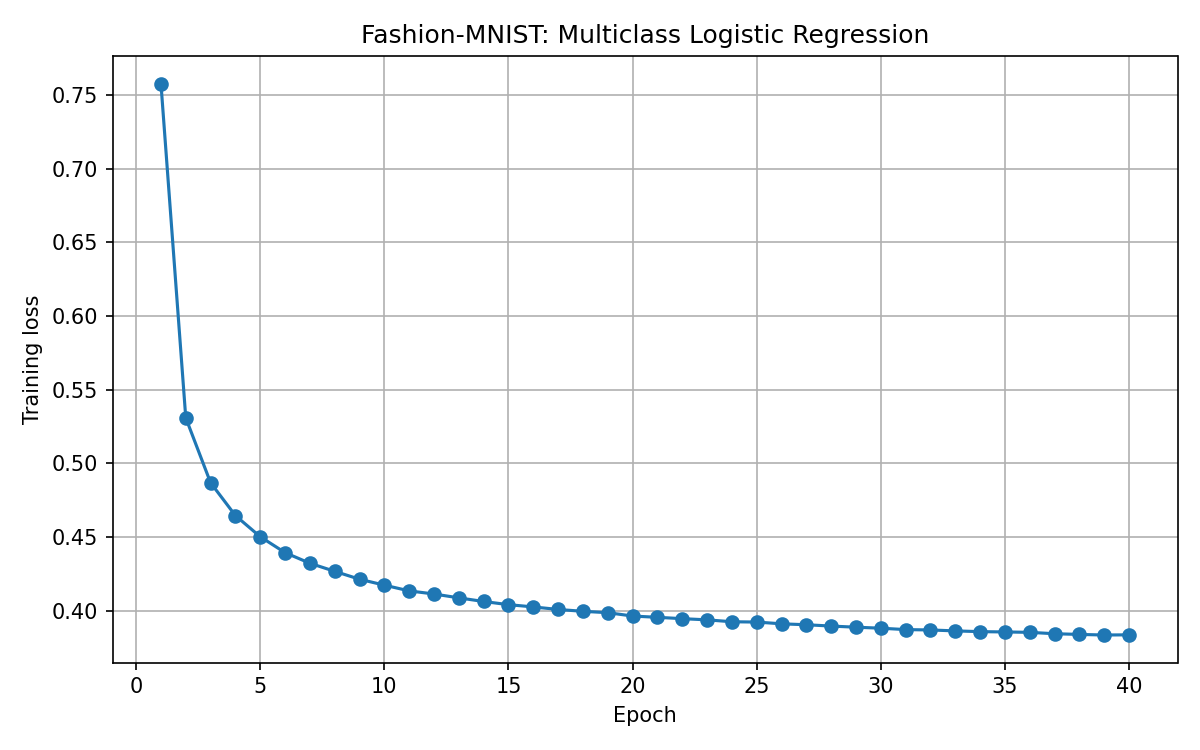
Training loss falls quickly in the first few epochs and then decreases more slowly, from about 0.76 to about 0.38. These values are read approximately from the plotted curve.
The loss graph displays epoch number on the horizontal axis and training loss on the vertical axis. It is also saved as outputs/training_loss.png.
The current graph contains only training loss; there is no validation curve in the supplied code. It cannot, by itself, tell us whether the model is overfitting.
plt.show() may pause the script until the plot window is closed. If the terminal seems to stop after training, close the loss plot to continue to evaluation.
25. Evaluation Mode and Disabled Gradients
model.eval()
with torch.no_grad():
    ...
eval() selects evaluation behavior. no_grad() disables gradient recording, reducing unnecessary work during prediction.
Neither operation trains the model. The evaluation loop contains no optimizer updates.
The labels remain on the CPU during evaluation because the script uses them only to collect the true answers for scikit-learn metrics.
26. Softmax and the Predicted Class
probabilities = torch.softmax(logits, dim=1)
predictions = probabilities.argmax(dim=1)
Softmax converts scores into ten probabilities that sum to 1 for each image:
\[P(y=k\mid x)=\frac{e^{z_k}}{\sum_{j=0}^{9}e^{z_j}}\]dim=1 means operate across the class columns for each row/image.
argmax(dim=1) returns the class index with the largest probability. If it returns 8, the prediction is Bag.
Softmax preserves score order, so logits.argmax(dim=1) would give the same predicted class. We keep probabilities because ROC evaluation needs them.
A high probability is a model estimate, not a guarantee of correctness.
27. Collecting Evaluation Results
| Array | Contents | Expected shape |
|---|---|---|
y_true | Correct labels | (10000,) |
y_pred | Predicted labels | (10000,) |
y_prob | Ten probabilities per image | (10000, 10) |
y_prob.extend(probabilities.cpu().numpy())
We preserve the class dimension. Flattening all probabilities into one long list would lose the image-by-class structure needed for multiclass ROC curves.
Moving prediction tensors to the CPU makes them available for NumPy conversion.
28. Accuracy
accuracy = accuracy_score(y_true, y_pred)
For an illustrative example, 8,500 correct predictions out of 10,000 would give 85% accuracy. This is an explanation of the calculation, not a measured result for this version of the code.
The script prints accuracy as a percentage using {accuracy:.2%}.
29. Classification Report
The report shows results for each category:
| Metric | Interpretation for the category “Bag” |
|---|---|
| Precision | Of the images predicted as bags, how many are actually bags? |
| Recall | Of the actual bags, how many did the model identify? |
| F1-score | Harmonic mean of precision and recall |
| Support | Number of actual bag images in the test set |
A model can have reasonable overall accuracy while performing poorly on a particular category. This report helps identify that difference.
zero_division=0 returns zero for undefined precision or recall cases rather than producing division warnings.
Macro average gives each class equal weight. Weighted average weights classes by their support. Fashion-MNIST has equal test support across its ten classes, so these averages should coincide apart from display details.
30. Confusion Matrix
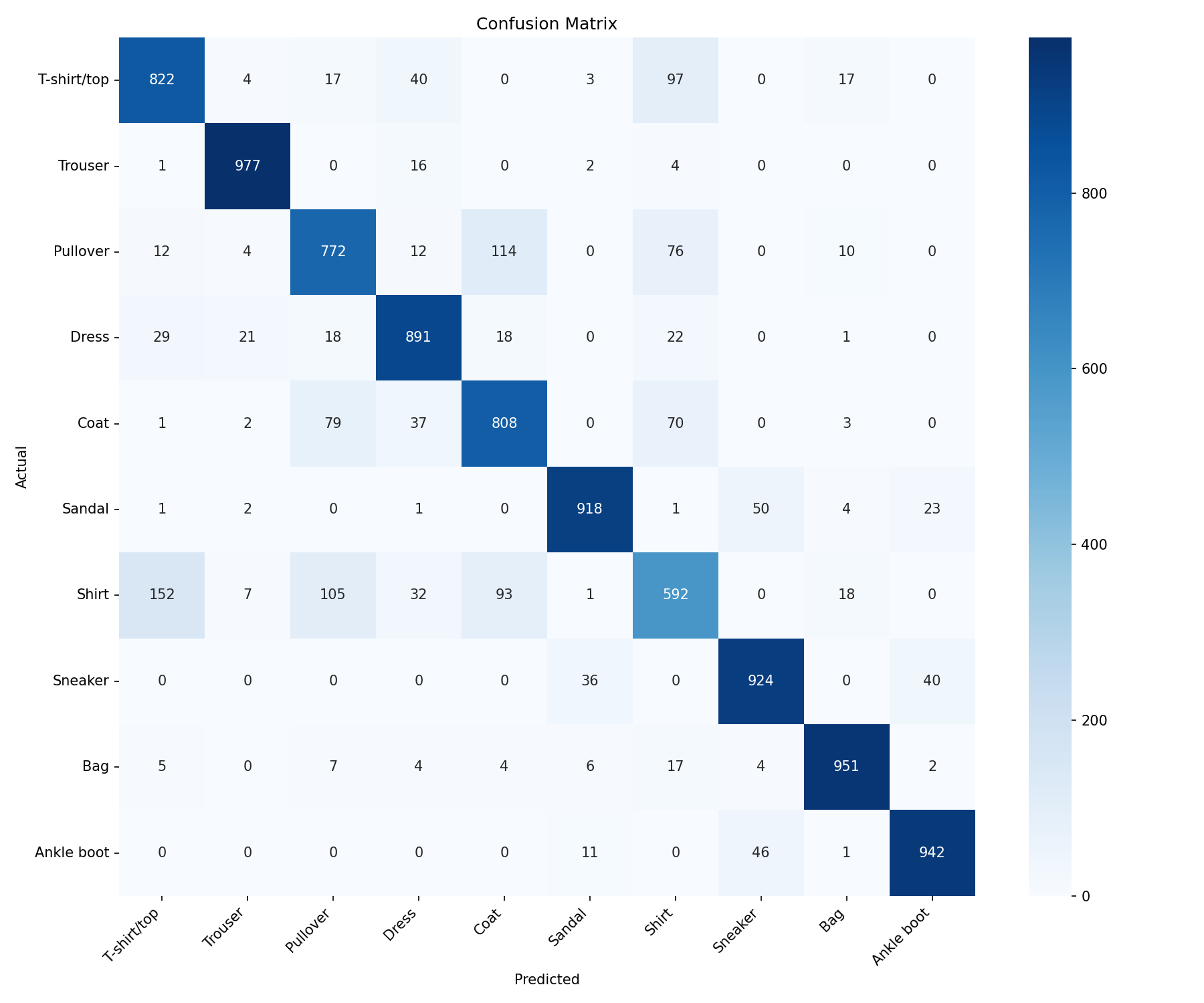
Rows are actual classes and columns are predictions. The diagonal contains 8,597 correct predictions out of 10,000 test images.
The confusion matrix compares actual and predicted labels:
- Rows represent actual categories.
- Columns represent predicted categories.
- Diagonal entries are correct predictions.
- Off-diagonal entries are mistakes.
For example, the entry in the actual Shirt row and predicted T-shirt/top column counts shirts mistaken for T-shirts.
Use the matrix to identify specific confusions rather than guessing from accuracy alone. The figure is saved as outputs/confusion_matrix.png.
31. One-Versus-Rest ROC Curves
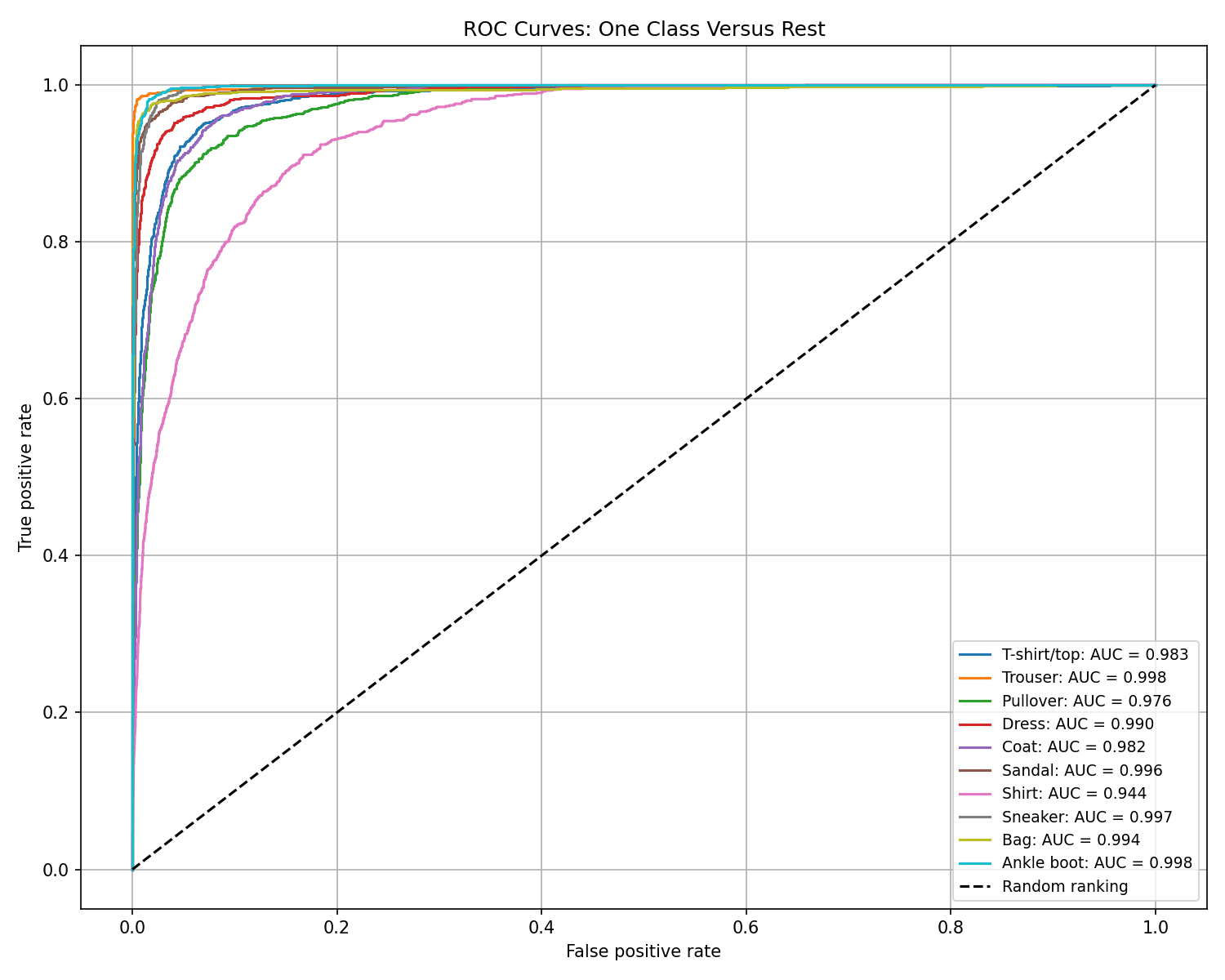
All ten curves lie above the random-ranking diagonal. Shirt has the lowest displayed AUC (0.944); Trouser and Ankle boot each have a displayed AUC of 0.998. Values in the legend are rounded.
Binary classification has one positive class. Here, we create a separate binary comparison for each clothing category.
binary_targets = (y_true == class_id).astype(int)
fpr, tpr, _ = roc_curve(binary_targets, y_prob[:, class_id])
For the Bag curve:
- Bag is the positive class.
- All nine other categories are negative.
- The score is the model’s predicted probability of Bag.
Varying the threshold gives different true-positive and false-positive rates. Each resulting ROC curve measures how the model ranks that class against the rest.
\[\text{TPR}=\frac{TP}{TP+FN}, \qquad \text{FPR}=\frac{FP}{FP+TN}\]The script skips a curve if either positive or negative examples are absent. All ten categories are present in the normal Fashion-MNIST test file.
32. Area Under the Curve: AUC
An AUC of 1 represents perfect ranking for that binary comparison. An AUC around 0.5 corresponds to random ranking.
class_auc = auc(fpr, tpr)
The script averages the available per-class AUCs. With all ten classes present, this is the unweighted mean of the ten one-versus-rest AUC values.
AUC is not accuracy. A high AUC does not mean the same percentage of images received the correct top-ranked class.
The curves are saved as outputs/roc_curves.png.
33. Baseline Comparison
baseline = DummyClassifier(strategy="most_frequent")
baseline.fit(X_train, y_train)
This baseline learns which class occurs most frequently in the training labels and always predicts that class. It does not learn image patterns.
In the balanced Fashion-MNIST dataset, the classes are tied in frequency. The implementation selects one of the tied classes, giving 10% accuracy on the balanced test set.
Comparing with this baseline helps show whether the trained model has learned useful information beyond always choosing one category. It does not prove suitability for real-world use.
34. Displaying Test Predictions
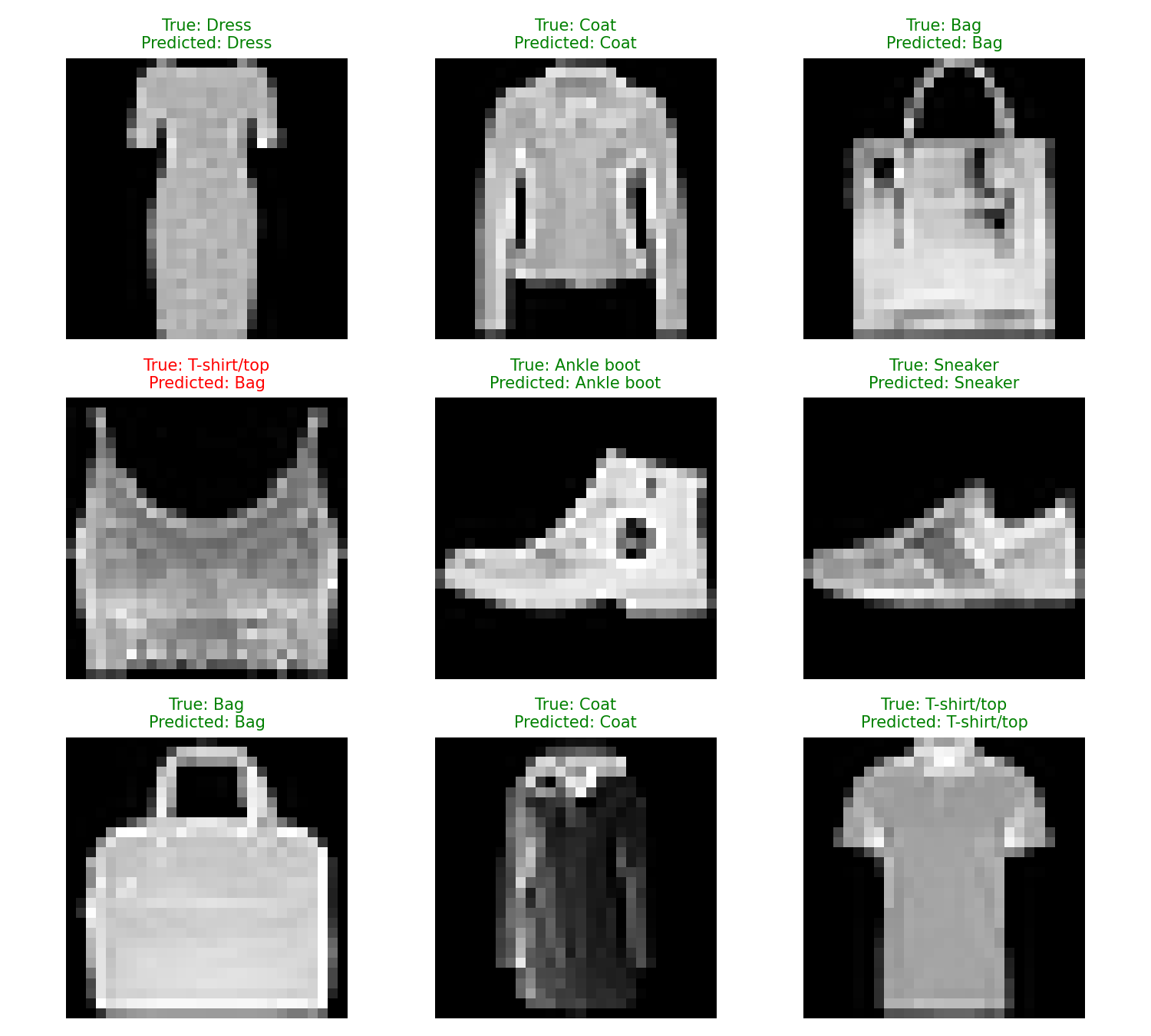
Eight of these nine examples are correct. The T-shirt/top in the second row is predicted as Bag. This small display illustrates predictions; overall test accuracy is 85.97%.
The script selects nine test images using a fixed NumPy random seed:
indices = rng.choice(len(X_test), size=min(9, len(X_test)), replace=False)
For display, a row of 784 pixels is reshaped back into an image:
X_test[index].reshape(28, 28)
Each title shows the true and predicted categories:
- Green means the prediction is correct.
- Red means it is incorrect.
The enlarged images look pixelated because their original resolution is only 28 × 28.
These nine examples illustrate behavior. Full test metrics provide a more representative evaluation than a small collection of images. The figure is saved as outputs/predictions.png.
35. Saving Results and Model Weights
The script writes these files inside outputs:
| File | Contents |
|---|---|
training_loss.png | Training-loss curve |
confusion_matrix.png | Class-by-class prediction counts |
roc_curves.png | One-versus-rest ROC curves |
predictions.png | Nine example predictions |
evaluation.txt | Test accuracy, baseline accuracy, and classification report |
fashion_logistic_model.pth | Trained weights and biases |
torch.save(model.state_dict(), model_path)
The state dictionary saves learned parameters. It does not include the model class definition, class names, or preprocessing code.
In this supplied script, model saving happens at the end, after the plots. Close each plot and wait for “Model saved successfully”. Rerunning the script in the same folder overwrites these output files.
36. Loading the Model Later
To use the weights, recreate the same architecture and layer name. A separate prediction program can start with:
from pathlib import Path
import torch
import torch.nn as nn

class FashionLogisticRegression(nn.Module):
    def __init__(self, input_size=784, num_classes=10):
        super().__init__()
        self.linear = nn.Linear(input_size, num_classes)

    def forward(self, x):
        return self.linear(x)

model = FashionLogisticRegression()
model_path = Path(__file__).resolve().parent / "outputs" / "fashion_logistic_model.pth"
model.load_state_dict(
    torch.load(model_path, map_location="cpu", weights_only=True)
)
model.eval()
This loading example is separate from the two main files. Do not import train_multiclass.py just to obtain its class, because its top-level code would start training again.
map_location="cpu" allows weights saved from GPU training to load on a CPU. The architecture and layer names must still match.
37. Preparing a New Image for Prediction
A new image must be prepared consistently:
- Frame one clothing item with positioning and background similar to the training data.
- Convert to grayscale.
- Resize to 28 × 28 pixels.
- Convert to
float32and divide by 255. - Flatten to 784 values and add a batch dimension.
- Run the model, apply softmax, and select the highest-scoring category.
The input tensor for one image has shape (1, 784).
Resizing alone does not make a photograph match Fashion-MNIST. A person wearing clothing in a busy scene differs substantially from an isolated product image. Image contrast and foreground/background appearance also matter.
No separate predict.py is included in the two-file project presented above; the training script’s sample predictions use held-out test images.
38. Results from the Supplied Run
The uploaded evaluation.txt reports these results:
| Metric | Value |
|---|---|
| Test accuracy | 85.97% |
| Correct predictions | 8,597 / 10,000 |
| Incorrect predictions | 1,403 / 10,000 |
| Most-frequent-class baseline accuracy | 10.00% |
The tutorial code uses learning rate 0.0005, 40 epochs, and weight decay 0.0001. The supplied figures show the results of the accompanying run; no training was rerun to create this page.
Classification report
Test accuracy: 0.8597
Baseline accuracy: 0.1000

              precision    recall  f1-score   support

 T-shirt/top       0.80      0.82      0.81      1000
     Trouser       0.96      0.98      0.97      1000
    Pullover       0.77      0.77      0.77      1000
       Dress       0.86      0.89      0.88      1000
        Coat       0.78      0.81      0.79      1000
      Sandal       0.94      0.92      0.93      1000
       Shirt       0.67      0.59      0.63      1000
     Sneaker       0.90      0.92      0.91      1000
         Bag       0.95      0.95      0.95      1000
  Ankle boot       0.94      0.94      0.94      1000

    accuracy                           0.86     10000
   macro avg       0.86      0.86      0.86     10000
weighted avg       0.86      0.86      0.86     10000
The classification report rounds accuracy to 0.86; the more precise value printed separately is 0.8597, or 85.97%.
What the confusion matrix shows
- Trouser: 977 of 1,000 examples are correctly classified, giving 97.7% recall.
- Bag: 951 of 1,000 examples are correctly classified.
- Shirt: 592 of 1,000 examples are correctly classified, giving 59.2% recall. This is the lowest recall among these classes.
- Of the actual shirts, 152 are predicted as T-shirt/top, 105 as Pullover, and 93 as Coat.
- Of the actual pullovers, 114 are predicted as Coat.
These counts show that errors are concentrated in some visually similar categories. Overall accuracy alone hides these differences.
Interpreting the ROC results
The ROC legend reports high one-versus-rest AUC values, but these measure ranking rather than top-class accuracy. For example, Shirt’s displayed AUC is 0.944 even though its recall is only 59.2% under the final argmax decision.
The exact mean AUC is not included in evaluation.txt. Read it from the training program’s terminal output if needed; do not present an average calculated from rounded legend values as the exact logged result.
Download the output files
Download the evaluation report · Download the trained model weights
The .pth file is a downloadable model artifact; a browser does not execute it as an image or chart. Use the matching PyTorch architecture and preprocessing described above to load it.
39. Comparing with the Breast-Cancer Project
| Feature | Earlier breast-cancer project | This Fashion-MNIST project |
|---|---|---|
| Input | 30 numerical measurements | 784 grayscale pixels |
| Task | Binary classification | Ten-class classification |
| Architecture | Hidden layers with ReLU | One linear layer |
| Outputs | One logit | Ten logits |
| Label tensor type | Floating point | Integer class indices (long) |
| Loss | BCEWithLogitsLoss | CrossEntropyLoss |
| Probability function | Sigmoid | Softmax |
| Decision | Probability threshold | Highest-scoring class |
| Scaling | Fitted StandardScaler | Fixed division by 255 |
| ROC | Binary curve | Ten one-versus-rest curves |
Both projects follow the same broader process: prepare data, predict, calculate loss, update parameters, evaluate, and save.
40. Limitations
The model learns linear class scores from raw pixels. Moving or rotating an item changes which pixel positions contain useful information, so the model is sensitive to presentation.
The ten-category classifier also has no “unknown” class. An image of a hat or an empty scene will still receive scores for the ten known categories and can receive a confident but incorrect label.
The current training code has no validation split or early stopping. It reports training loss and evaluates the final epoch on the supplied test set.
Performance on Fashion-MNIST does not establish performance on clothing photographs from a phone or webcam.
41. Future Improvements
For experiments that keep logistic regression:
- Make a stratified validation split from the training file.
- Compare learning rates and weight decay using that validation set.
- Monitor validation loss and save the best validation checkpoint.
- Analyze mistakes by category and inspect difficult images.
- Keep the supplied test set for the final evaluation.
Adding hidden layers with ReLU creates a multilayer neural network. Adding convolution layers creates a CNN. Those are useful comparisons, but they change the model family and should be named clearly.
More epochs or more parameters do not guarantee better test accuracy.
42. What This Project Teaches
This project connects image representation to machine learning:
- An image can be represented as a list of pixel values.
- A class label identifies a category rather than a numerical quantity.
- One linear layer learns separate weights for every category.
- Cross-entropy trains the model using logits and correct labels.
- Softmax produces class probabilities; argmax selects a category.
- Accuracy, class metrics, and confusion matrices answer different questions.
- A saved model needs its architecture, label mapping, and preprocessing to be reused correctly.
43. Conclusion
We built a complete multiclass logistic regression workflow for clothing-image classification. Starting with Kaggle CSV files, we prepared 784-pixel inputs, trained a ten-output linear model, evaluated it on held-out images, visualized errors, and saved its parameters.
This provides a foundation for comparing logistic regression with hidden-layer networks and CNNs while keeping the dataset and evaluation process consistent.
44. References
- Fashion-MNIST dataset on Kaggle.
- Fashion-MNIST: original dataset repository, Zalando Research.
- KaggleHub: dataset download documentation.
- PyTorch: Linear.
- PyTorch: CrossEntropyLoss.
- PyTorch: Adam.
- Scikit-learn: classification_report.
- Scikit-learn: roc_curve.
- Scikit-learn: DummyClassifier.
- Related lesson: Breast Cancer Classification using PyTorch.